AZ-104 시험 문제 및 해설 (1-49번 완전판)
문제 번호: 1 | 토픽 번호: 3
영어 원문:
You have an Azure subscription named Subscription1 that contains the storage accounts shown in the following table:

You plan to use the Azure Import/Export service to export data from Subscription1.
You need to identify which storage account can be used to export the data.
What should you identify?
You have an Azure subscription named Subscription1 that contains the storage accounts shown in the following table:
You plan to use the Azure Import/Export service to export data from Subscription1.
You need to identify which storage account can be used to export the data.
What should you identify?
한글 번역:
다음 표에 표시된 스토리지 계정이 포함된 Subscription1이라는 Azure 구독이 있습니다:
Azure Import/Export 서비스를 사용하여 Subscription1에서 데이터를 내보낼 계획입니다.
데이터를 내보내는 데 사용할 수 있는 스토리지 계정을 식별해야 합니다.
무엇을 식별해야 합니까?
다음 표에 표시된 스토리지 계정이 포함된 Subscription1이라는 Azure 구독이 있습니다:
Azure Import/Export 서비스를 사용하여 Subscription1에서 데이터를 내보낼 계획입니다.
데이터를 내보내는 데 사용할 수 있는 스토리지 계정을 식별해야 합니다.
무엇을 식별해야 합니까?
A. storage1
B. storage2
C. storage3
D. storage4
제시된 답변: D
문제 해석:
Azure Import/Export 서비스의 요구사항을 이해하는 문제입니다. Import/Export 서비스는 특정 조건을 만족하는 스토리지 계정에서만 사용할 수 있습니다.
Azure Import/Export 서비스의 요구사항을 이해하는 문제입니다. Import/Export 서비스는 특정 조건을 만족하는 스토리지 계정에서만 사용할 수 있습니다.
해설:
Azure Import/Export 서비스를 사용하려면 다음 조건을 만족해야 합니다:
• General Purpose v1 (GPv1) 또는 General Purpose v2 (GPv2) 스토리지 계정
• Blob Storage 계정도 지원됨
• Premium Storage는 지원되지 않음
• 특정 지역에서 지원됨
표의 정보를 바탕으로 storage4가 이러한 조건을 만족하는 계정으로 판단됩니다.
Azure Import/Export 서비스를 사용하려면 다음 조건을 만족해야 합니다:
• General Purpose v1 (GPv1) 또는 General Purpose v2 (GPv2) 스토리지 계정
• Blob Storage 계정도 지원됨
• Premium Storage는 지원되지 않음
• 특정 지역에서 지원됨
표의 정보를 바탕으로 storage4가 이러한 조건을 만족하는 계정으로 판단됩니다.
문제 번호: 2 | 토픽 번호: 3
영어 원문:
HOTSPOT -
You have Azure Storage accounts as shown in the following exhibit.
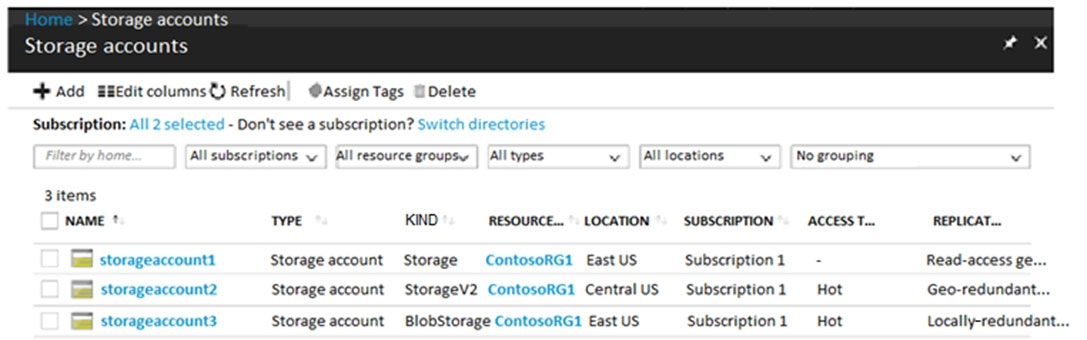
Use the drop-down menus to select the answer choice that completes each statement based on the information presented in the graphic.
NOTE: Each correct selection is worth one point.
Hot Area:

HOTSPOT -
You have Azure Storage accounts as shown in the following exhibit.
Use the drop-down menus to select the answer choice that completes each statement based on the information presented in the graphic.
NOTE: Each correct selection is worth one point.
Hot Area:
한글 번역:
핫스팟 -
다음 전시에 표시된 Azure Storage 계정이 있습니다.
그래픽에 제시된 정보를 기반으로 각 문을 완성하는 답변 선택지를 드롭다운 메뉴를 사용하여 선택하십시오.
참고: 각 올바른 선택은 1점의 가치가 있습니다.
핫 영역:
핫스팟 -
다음 전시에 표시된 Azure Storage 계정이 있습니다.
그래픽에 제시된 정보를 기반으로 각 문을 완성하는 답변 선택지를 드롭다운 메뉴를 사용하여 선택하십시오.
참고: 각 올바른 선택은 1점의 가치가 있습니다.
핫 영역:
제시된 답변:
문제 해석:
다양한 Azure Storage 계정 유형의 특성과 지원되는 기능을 이해하는 문제입니다.
다양한 Azure Storage 계정 유형의 특성과 지원되는 기능을 이해하는 문제입니다.
해설:
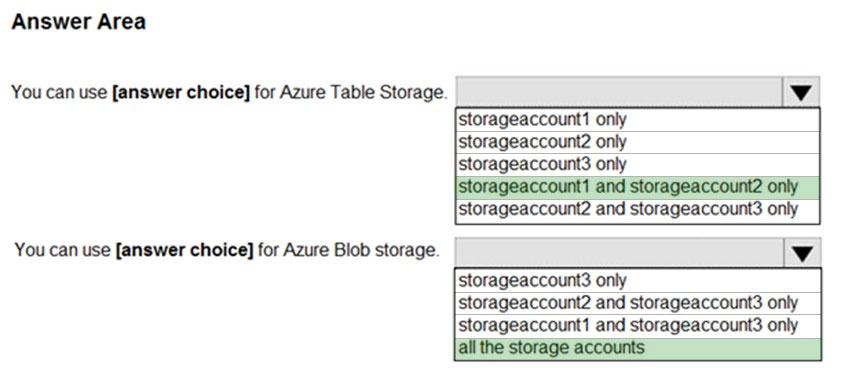
Box 1: storageaccount1 and storageaccount2 only
Box 2: All the storage accounts
주요 스토리지 계정 유형:
• General-purpose v2 (GPv2) accounts: 최신 기능 지원
• Blob storage accounts: 블록 blob만 지원
• General-purpose v1 (GPv1) accounts: 모든 서비스 지원하지만 최신 기능은 제한적
참조: https://docs.microsoft.com/en-us/azure/storage/common/storage-account-options
Box 1: storageaccount1 and storageaccount2 only
Box 2: All the storage accounts
주요 스토리지 계정 유형:
• General-purpose v2 (GPv2) accounts: 최신 기능 지원
• Blob storage accounts: 블록 blob만 지원
• General-purpose v1 (GPv1) accounts: 모든 서비스 지원하지만 최신 기능은 제한적
참조: https://docs.microsoft.com/en-us/azure/storage/common/storage-account-options
문제 번호: 3 | 토픽 번호: 3
영어 원문:
You have Azure subscription that includes data in following locations:
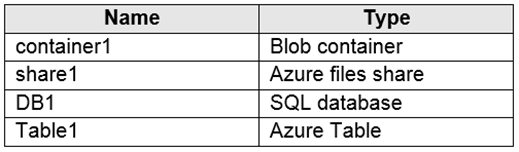
You plan to export data by using Azure import/export job named Export1.
You need to identify the data that can be exported by using Export1.
Which data should you identify?
You have Azure subscription that includes data in following locations:
You plan to export data by using Azure import/export job named Export1.
You need to identify the data that can be exported by using Export1.
Which data should you identify?
한글 번역:
다음 위치에 데이터가 포함된 Azure 구독이 있습니다:
Export1이라는 Azure import/export 작업을 사용하여 데이터를 내보낼 계획입니다.
Export1을 사용하여 내보낼 수 있는 데이터를 식별해야 합니다.
어떤 데이터를 식별해야 합니까?
다음 위치에 데이터가 포함된 Azure 구독이 있습니다:
Export1이라는 Azure import/export 작업을 사용하여 데이터를 내보낼 계획입니다.
Export1을 사용하여 내보낼 수 있는 데이터를 식별해야 합니다.
어떤 데이터를 식별해야 합니까?
A. DB1
B. container1
C. share1
D. Table1
제시된 답변: B
문제 해석:
Azure Import/Export 서비스가 지원하는 데이터 유형을 이해하는 문제입니다.
Azure Import/Export 서비스가 지원하는 데이터 유형을 이해하는 문제입니다.
해설:
Azure Import/Export 서비스는 Azure Blob Storage와 Azure Files만 지원합니다. container1은 Blob 컨테이너이므로 지원됩니다.
Azure Import/Export 서비스는 Azure Blob Storage와 Azure Files만 지원합니다. container1은 Blob 컨테이너이므로 지원됩니다.
문제 번호: 4 | 토픽 번호: 3
영어 원문:
HOTSPOT -
You have an Azure Storage account named storage1.
You have an Azure App Service app named App1 and an app named App2 that runs in an Azure container instance. Each app uses a managed identity.
You need to ensure that App1 and App2 can read blobs from storage1. The solution must meet the following requirements:
✑ Minimize the number of secrets used.
✑ Ensure that App2 can only read from storage1 for the next 30 days.
What should you configure in storage1 for each app?
HOTSPOT -
You have an Azure Storage account named storage1.
You have an Azure App Service app named App1 and an app named App2 that runs in an Azure container instance. Each app uses a managed identity.
You need to ensure that App1 and App2 can read blobs from storage1. The solution must meet the following requirements:
✑ Minimize the number of secrets used.
✑ Ensure that App2 can only read from storage1 for the next 30 days.
What should you configure in storage1 for each app?
한글 번역:
핫스팟 -
storage1이라는 Azure Storage 계정이 있습니다.
App1이라는 Azure App Service 앱과 Azure 컨테이너 인스턴스에서 실행되는 App2라는 앱이 있습니다. 각 앱은 관리 ID를 사용합니다.
App1과 App2가 storage1에서 blob을 읽을 수 있도록 해야 합니다. 솔루션은 다음 요구 사항을 충족해야 합니다:
✑ 사용되는 비밀의 수를 최소화합니다.
✑ App2가 향후 30일 동안만 storage1에서 읽을 수 있도록 합니다.
핫스팟 -
storage1이라는 Azure Storage 계정이 있습니다.
App1이라는 Azure App Service 앱과 Azure 컨테이너 인스턴스에서 실행되는 App2라는 앱이 있습니다. 각 앱은 관리 ID를 사용합니다.
App1과 App2가 storage1에서 blob을 읽을 수 있도록 해야 합니다. 솔루션은 다음 요구 사항을 충족해야 합니다:
✑ 사용되는 비밀의 수를 최소화합니다.
✑ App2가 향후 30일 동안만 storage1에서 읽을 수 있도록 합니다.
제시된 답변:

문제 해석:
Azure Storage 액세스 제어와 관리 ID 사용 시나리오를 이해하는 문제입니다.
Azure Storage 액세스 제어와 관리 ID 사용 시나리오를 이해하는 문제입니다.
해설:
App1: Azure AD 통합 사용
App2: 시간 제한이 있는 SAS 토큰 사용
App1: Azure AD 통합 사용
App2: 시간 제한이 있는 SAS 토큰 사용
문제 번호: 5 | 토픽 번호: 3
영어 원문:
HOTSPOT -
You need to create an Azure Storage account that meets the following requirements:
✑ Minimizes costs
✑ Supports hot, cool, and archive blob tiers
✑ Provides fault tolerance if a disaster affects the Azure region where the account resides
How should you complete the command?
HOTSPOT -
You need to create an Azure Storage account that meets the following requirements:
✑ Minimizes costs
✑ Supports hot, cool, and archive blob tiers
✑ Provides fault tolerance if a disaster affects the Azure region where the account resides
How should you complete the command?
한글 번역:
핫스팟 -
다음 요구 사항을 충족하는 Azure Storage 계정을 만들어야 합니다:
✑ 비용을 최소화합니다
✑ hot, cool, archive blob 계층을 지원합니다
✑ 계정이 있는 Azure 지역에 재해가 영향을 미치는 경우 내결함성을 제공합니다
핫스팟 -
다음 요구 사항을 충족하는 Azure Storage 계정을 만들어야 합니다:
✑ 비용을 최소화합니다
✑ hot, cool, archive blob 계층을 지원합니다
✑ 계정이 있는 Azure 지역에 재해가 영향을 미치는 경우 내결함성을 제공합니다
제시된 답변:
문제 해석:
Azure Storage 계정 유형과 중복성 옵션을 이해하는 문제입니다.
Azure Storage 계정 유형과 중복성 옵션을 이해하는 문제입니다.
해설:
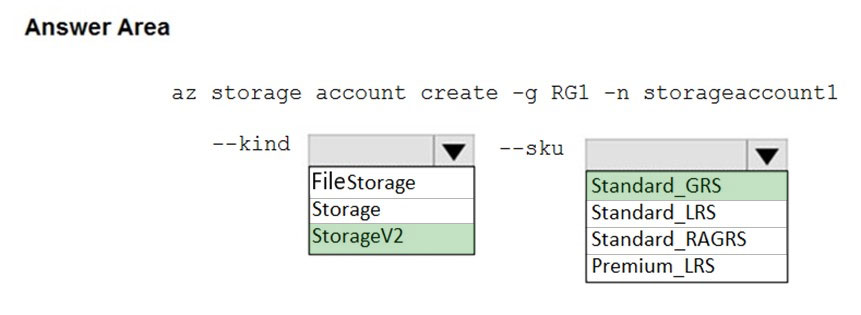
Box 1: StorageV2 - blob 계층화 지원
Box 2: Standard_GRS - 지역 간 중복성 제공
Box 1: StorageV2 - blob 계층화 지원
Box 2: Standard_GRS - 지역 간 중복성 제공
문제 번호: 6 | 토픽 번호: 3
영어 원문:
You have an Azure subscription that contains the resources in the following table.
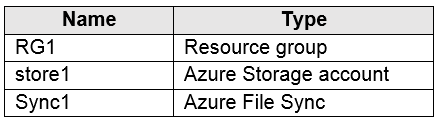
Store1 contains a file share named data. Data contains 5,000 files.
You need to synchronize the files in the file share named data to an on-premises server named Server1.
Which three actions should you perform? Each correct answer presents part of the solution.
You have an Azure subscription that contains the resources in the following table.
Store1 contains a file share named data. Data contains 5,000 files.
You need to synchronize the files in the file share named data to an on-premises server named Server1.
Which three actions should you perform? Each correct answer presents part of the solution.
한글 번역:
다음 표의 리소스가 포함된 Azure 구독이 있습니다.
Store1에는 data라는 파일 공유가 포함되어 있습니다. Data에는 5,000개의 파일이 포함되어 있습니다.
data라는 파일 공유의 파일을 Server1이라는 온프레미스 서버와 동기화해야 합니다.
어떤 세 가지 작업을 수행해야 합니까?
다음 표의 리소스가 포함된 Azure 구독이 있습니다.
Store1에는 data라는 파일 공유가 포함되어 있습니다. Data에는 5,000개의 파일이 포함되어 있습니다.
data라는 파일 공유의 파일을 Server1이라는 온프레미스 서버와 동기화해야 합니다.
어떤 세 가지 작업을 수행해야 합니까?
A. Create a container instance
B. Register Server1
C. Install the Azure File Sync agent on Server1
D. Download an automation script
E. Create a sync group
제시된 답변: BCE
문제 해석:
Azure File Sync를 사용하여 Azure Files와 온프레미스 서버 간 동기화를 설정하는 단계를 이해하는 문제입니다.
Azure File Sync를 사용하여 Azure Files와 온프레미스 서버 간 동기화를 설정하는 단계를 이해하는 문제입니다.
해설:
Azure File Sync 설정 단계:
B. Register Server1 - Storage Sync Service에 서버를 등록
C. Install the Azure File Sync agent - 온프레미스 서버에 동기화 에이전트를 설치
E. Create a sync group - 클라우드 엔드포인트와 서버 엔드포인트를 포함하는 동기화 그룹을 생성
Azure File Sync 설정 단계:
B. Register Server1 - Storage Sync Service에 서버를 등록
C. Install the Azure File Sync agent - 온프레미스 서버에 동기화 에이전트를 설치
E. Create a sync group - 클라우드 엔드포인트와 서버 엔드포인트를 포함하는 동기화 그룹을 생성
문제 번호: 7 | 토픽 번호: 3
영어 원문:
HOTSPOT -
You have an Azure subscription that contains the resources shown in the following table.

The status of VM1 is Running.
You assign an Azure policy as shown in the exhibit.
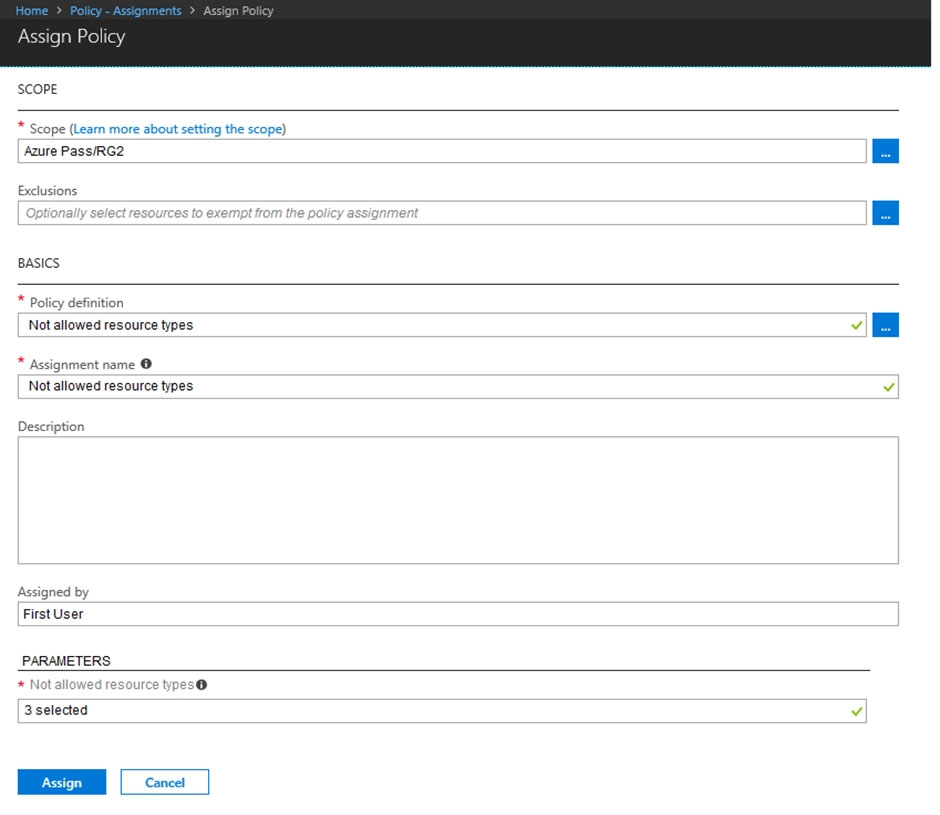
You assign the policy by using the following parameters:
Microsoft.ClassicNetwork/virtualNetworks
Microsoft.Network/virtualNetworks
Microsoft.Compute/virtualMachines
HOTSPOT -
You have an Azure subscription that contains the resources shown in the following table.
The status of VM1 is Running.
You assign an Azure policy as shown in the exhibit.
You assign the policy by using the following parameters:
Microsoft.ClassicNetwork/virtualNetworks
Microsoft.Network/virtualNetworks
Microsoft.Compute/virtualMachines
한글 번역:
핫스팟 -
다음 표에 표시된 리소스가 포함된 Azure 구독이 있습니다.
VM1의 상태는 실행 중입니다.
전시에 표시된 대로 Azure 정책을 할당합니다.
핫스팟 -
다음 표에 표시된 리소스가 포함된 Azure 구독이 있습니다.
VM1의 상태는 실행 중입니다.
전시에 표시된 대로 Azure 정책을 할당합니다.
제시된 답변:

문제 해석:
Azure Policy의 효과와 리소스에 대한 영향을 이해하는 문제입니다.
Azure Policy의 효과와 리소스에 대한 영향을 이해하는 문제입니다.
해설:
Azure Policy는 정책 할당 후에 생성되는 리소스에만 적용됩니다. 기존 리소스는 영향을 받지 않습니다.
Azure Policy는 정책 할당 후에 생성되는 리소스에만 적용됩니다. 기존 리소스는 영향을 받지 않습니다.
문제 번호: 8 | 토픽 번호: 3
영어 원문:
DRAG DROP -
You have an Azure subscription that contains a storage account.
You have an on-premises server named Server1 that runs Windows Server 2016. Server1 has 2 TB of data.
You need to transfer the data to the storage account by using the Azure Import/Export service.
In which order should you perform the actions?
DRAG DROP -
You have an Azure subscription that contains a storage account.
You have an on-premises server named Server1 that runs Windows Server 2016. Server1 has 2 TB of data.
You need to transfer the data to the storage account by using the Azure Import/Export service.
In which order should you perform the actions?
한글 번역:
드래그 앤 드롭 -
스토리지 계정이 포함된 Azure 구독이 있습니다.
Windows Server 2016을 실행하는 Server1이라는 온프레미스 서버가 있습니다. Server1에는 2TB의 데이터가 있습니다.
Azure Import/Export 서비스를 사용하여 데이터를 스토리지 계정으로 전송해야 합니다.
어떤 순서로 작업을 수행해야 합니까?
드래그 앤 드롭 -
스토리지 계정이 포함된 Azure 구독이 있습니다.
Windows Server 2016을 실행하는 Server1이라는 온프레미스 서버가 있습니다. Server1에는 2TB의 데이터가 있습니다.
Azure Import/Export 서비스를 사용하여 데이터를 스토리지 계정으로 전송해야 합니다.
어떤 순서로 작업을 수행해야 합니까?
제시된 답변:
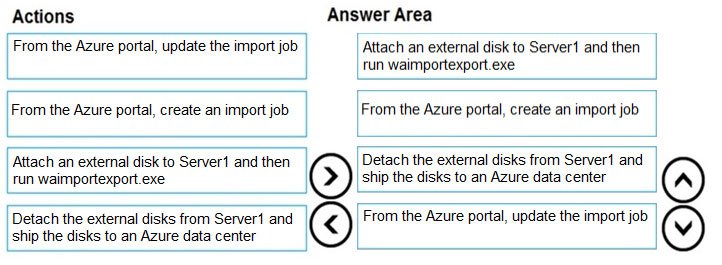
문제 해석:
Azure Import/Export 서비스의 워크플로우를 이해하는 문제입니다.
Azure Import/Export 서비스의 워크플로우를 이해하는 문제입니다.
해설:
Import/Export 작업 순서:
1. 외부 디스크를 Server1에 연결하고 WAImportExport.exe 실행
2. Azure 포털에서 import 작업 생성
3. Server1에서 외부 디스크를 분리하고 Azure 데이터 센터로 배송
4. Azure 포털에서 import 작업 업데이트
Import/Export 작업 순서:
1. 외부 디스크를 Server1에 연결하고 WAImportExport.exe 실행
2. Azure 포털에서 import 작업 생성
3. Server1에서 외부 디스크를 분리하고 Azure 데이터 센터로 배송
4. Azure 포털에서 import 작업 업데이트
문제 번호: 9 | 토픽 번호: 3
영어 원문:
HOTSPOT -
You have Azure subscription that includes following Azure file shares:

You have the following on-premises servers:
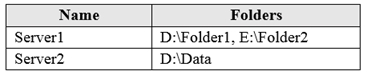
You create a Storage Sync Service named Sync1 and an Azure File Sync group named Group1. Group1 uses share1 as a cloud endpoint.
You register Server1 and Server2 in Sync1. You add D:\Folder1 on Server1 as a server endpoint of Group1.
HOTSPOT -
You have Azure subscription that includes following Azure file shares:
You have the following on-premises servers:
You create a Storage Sync Service named Sync1 and an Azure File Sync group named Group1. Group1 uses share1 as a cloud endpoint.
You register Server1 and Server2 in Sync1. You add D:\Folder1 on Server1 as a server endpoint of Group1.
한글 번역:
핫스팟 -
다음 Azure 파일 공유가 포함된 Azure 구독이 있습니다:
다음 온프레미스 서버가 있습니다:
Sync1이라는 Storage Sync Service와 Group1이라는 Azure File Sync 그룹을 만듭니다. Group1은 share1을 클라우드 엔드포인트로 사용합니다.
Sync1에 Server1과 Server2를 등록합니다. Server1의 D:\Folder1을 Group1의 서버 엔드포인트로 추가합니다.
핫스팟 -
다음 Azure 파일 공유가 포함된 Azure 구독이 있습니다:
다음 온프레미스 서버가 있습니다:
Sync1이라는 Storage Sync Service와 Group1이라는 Azure File Sync 그룹을 만듭니다. Group1은 share1을 클라우드 엔드포인트로 사용합니다.
Sync1에 Server1과 Server2를 등록합니다. Server1의 D:\Folder1을 Group1의 서버 엔드포인트로 추가합니다.
제시된 답변:

문제 해석:
Azure File Sync 동기화 그룹의 동작을 이해하는 문제입니다.
Azure File Sync 동기화 그룹의 동작을 이해하는 문제입니다.
해설:
Azure File Sync는 동기화 그룹에 포함된 엔드포인트 간에만 동기화가 발생합니다.
Azure File Sync는 동기화 그룹에 포함된 엔드포인트 간에만 동기화가 발생합니다.
문제 번호: 10 | 토픽 번호: 3
영어 원문:
DRAG DROP -
You have an Azure subscription named Subscription1.
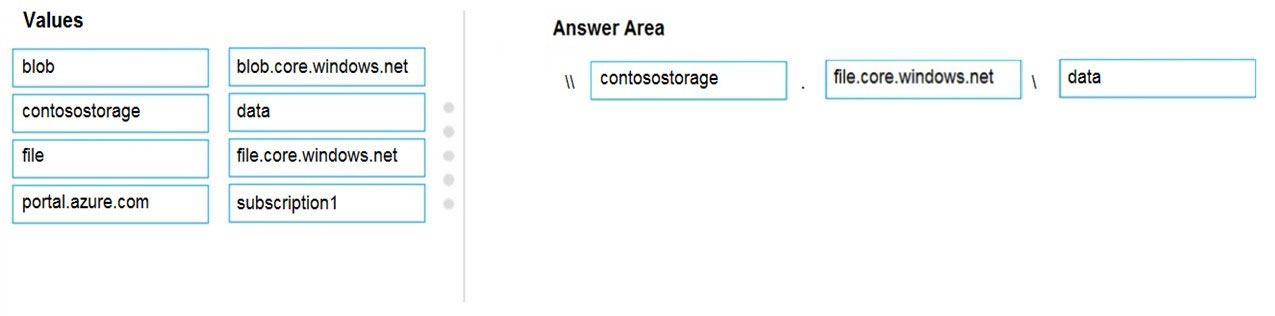
You create an Azure Storage account named contosostorage, and then you create a file share named data.
Which UNC path should you include in a script that references files from the data file share?
DRAG DROP -
You have an Azure subscription named Subscription1.
You create an Azure Storage account named contosostorage, and then you create a file share named data.
Which UNC path should you include in a script that references files from the data file share?
한글 번역:
드래그 앤 드롭 -
Subscription1이라는 Azure 구독이 있습니다.
contosostorage라는 Azure Storage 계정을 만든 다음 data라는 파일 공유를 만듭니다.
data 파일 공유의 파일을 참조하는 스크립트에 포함해야 하는 UNC 경로는 무엇입니까?
드래그 앤 드롭 -
Subscription1이라는 Azure 구독이 있습니다.
contosostorage라는 Azure Storage 계정을 만든 다음 data라는 파일 공유를 만듭니다.
data 파일 공유의 파일을 참조하는 스크립트에 포함해야 하는 UNC 경로는 무엇입니까?
제시된 답변:
문제 해석:
Azure Files의 UNC 경로 구조를 이해하는 문제입니다.
Azure Files의 UNC 경로 구조를 이해하는 문제입니다.
해설:
Box 1: contosostorage - 계정 이름
Box 2: file.core.windows.net - Azure Files 엔드포인트
Box 3: data - 파일 공유 이름
UNC 경로: \\contosostorage.file.core.windows.net\data
Box 1: contosostorage - 계정 이름
Box 2: file.core.windows.net - Azure Files 엔드포인트
Box 3: data - 파일 공유 이름
UNC 경로: \\contosostorage.file.core.windows.net\data
문제 번호: 11 | 토픽 번호: 3
영어 원문:
HOTSPOT -
You have an Azure subscription that contains an Azure Storage account.
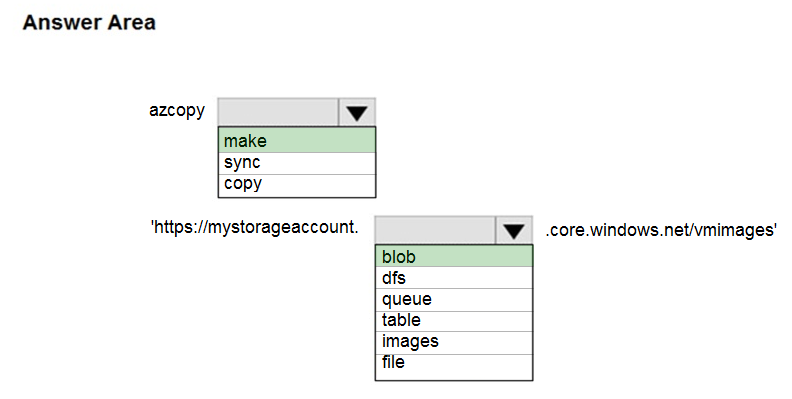
You plan to copy an on-premises virtual machine image to a container named vmimages.
You need to create the container for the planned image.
Which command should you run?
HOTSPOT -
You have an Azure subscription that contains an Azure Storage account.
You plan to copy an on-premises virtual machine image to a container named vmimages.
You need to create the container for the planned image.
Which command should you run?
한글 번역:
핫스팟 -
Azure Storage 계정이 포함된 Azure 구독이 있습니다.
온프레미스 가상 머신 이미지를 vmimages라는 컨테이너에 복사할 계획입니다.
계획된 이미지를 위한 컨테이너를 만들어야 합니다.
어떤 명령을 실행해야 합니까?
핫스팟 -
Azure Storage 계정이 포함된 Azure 구독이 있습니다.
온프레미스 가상 머신 이미지를 vmimages라는 컨테이너에 복사할 계획입니다.
계획된 이미지를 위한 컨테이너를 만들어야 합니다.
어떤 명령을 실행해야 합니까?
제시된 답변:
문제 해석:
Azure CLI를 사용하여 Blob 컨테이너를 생성하는 명령을 이해하는 문제입니다.
Azure CLI를 사용하여 Blob 컨테이너를 생성하는 명령을 이해하는 문제입니다.
해설:
Azure CLI 명령 `az storage container create`를 사용하여 Blob 컨테이너를 생성합니다.
Azure CLI 명령 `az storage container create`를 사용하여 Blob 컨테이너를 생성합니다.
문제 번호: 12 | 토픽 번호: 3
영어 원문:
HOTSPOT -
You have an Azure File sync group that has the endpoints shown in the following table.
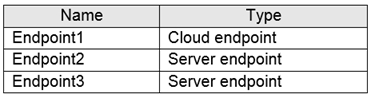
Cloud tiering is enabled for Endpoint3.
You add a file named File1 to Endpoint1 and a file named File2 to Endpoint2.
On which endpoints will File1 and File2 be available within 24 hours of adding the files?
HOTSPOT -
You have an Azure File sync group that has the endpoints shown in the following table.
Cloud tiering is enabled for Endpoint3.
You add a file named File1 to Endpoint1 and a file named File2 to Endpoint2.
On which endpoints will File1 and File2 be available within 24 hours of adding the files?
한글 번역:
핫스팟 -
다음 표에 표시된 엔드포인트가 있는 Azure File 동기화 그룹이 있습니다.
Endpoint3에 대해 클라우드 계층화가 활성화되어 있습니다.
Endpoint1에 File1이라는 파일을 추가하고 Endpoint2에 File2라는 파일을 추가합니다.
파일을 추가한 후 24시간 이내에 File1과 File2를 어떤 엔드포인트에서 사용할 수 있습니까?
핫스팟 -
다음 표에 표시된 엔드포인트가 있는 Azure File 동기화 그룹이 있습니다.
Endpoint3에 대해 클라우드 계층화가 활성화되어 있습니다.
Endpoint1에 File1이라는 파일을 추가하고 Endpoint2에 File2라는 파일을 추가합니다.
파일을 추가한 후 24시간 이내에 File1과 File2를 어떤 엔드포인트에서 사용할 수 있습니까?
제시된 답변:

문제 해석:
Azure File Sync의 동기화 동작과 클라우드 계층화의 영향을 이해하는 문제입니다.
Azure File Sync의 동기화 동작과 클라우드 계층화의 영향을 이해하는 문제입니다.
해설:
Azure File Sync는 동기화 그룹의 모든 엔드포인트 간에 파일을 동기화합니다. 클라우드 계층화는 파일 가용성에 영향을 주지 않습니다.
Azure File Sync는 동기화 그룹의 모든 엔드포인트 간에 파일을 동기화합니다. 클라우드 계층화는 파일 가용성에 영향을 주지 않습니다.
문제 번호: 13 | 토픽 번호: 3
영어 원문:
HOTSPOT -
You have several Azure virtual machines on a virtual network named VNet1.
You configure an Azure Storage account as shown in the following exhibit.
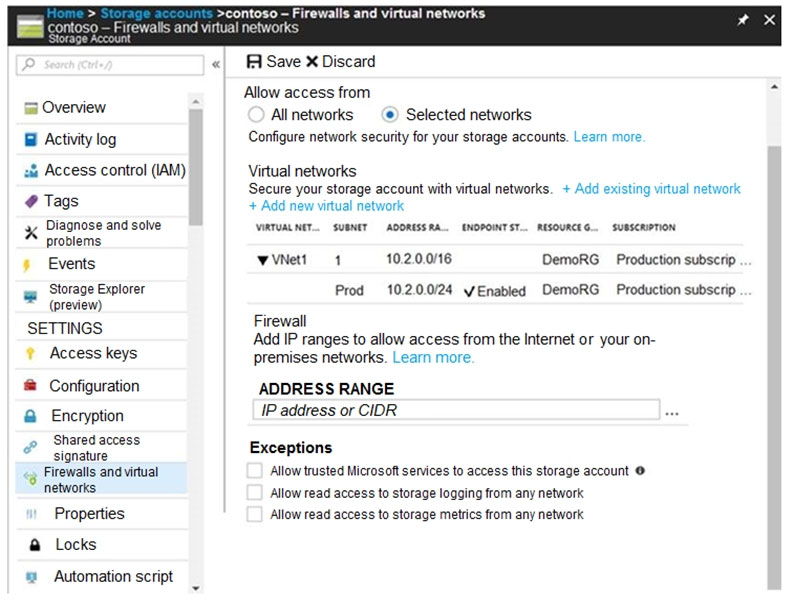
Use the drop-down menus to select the answer choice that completes each statement based on the information presented in the graphic.
HOTSPOT -
You have several Azure virtual machines on a virtual network named VNet1.
You configure an Azure Storage account as shown in the following exhibit.
Use the drop-down menus to select the answer choice that completes each statement based on the information presented in the graphic.
한글 번역:
핫스팟 -
VNet1이라는 가상 네트워크에 여러 Azure 가상 머신이 있습니다.
다음 전시에 표시된 대로 Azure Storage 계정을 구성합니다.
그래픽에 제시된 정보를 기반으로 각 문을 완성하는 답변 선택지를 드롭다운 메뉴를 사용하여 선택하십시오.
핫스팟 -
VNet1이라는 가상 네트워크에 여러 Azure 가상 머신이 있습니다.
다음 전시에 표시된 대로 Azure Storage 계정을 구성합니다.
그래픽에 제시된 정보를 기반으로 각 문을 완성하는 답변 선택지를 드롭다운 메뉴를 사용하여 선택하십시오.
제시된 답변:
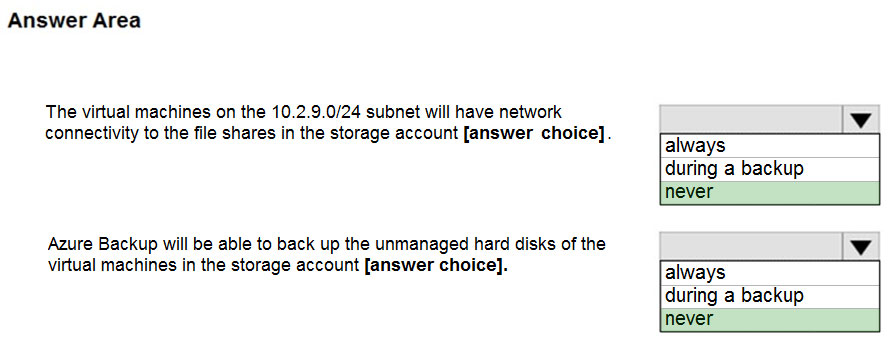
문제 해석:
Azure Storage 방화벽과 가상 네트워크 액세스 제어를 이해하는 문제입니다.
Azure Storage 방화벽과 가상 네트워크 액세스 제어를 이해하는 문제입니다.
해설:
Box 1: never - 10.2.9.0/24 서브넷이 허용 목록에 없음
Box 2: never - 신뢰할 수 있는 Microsoft 서비스 허용이 필요함
Box 1: never - 10.2.9.0/24 서브넷이 허용 목록에 없음
Box 2: never - 신뢰할 수 있는 Microsoft 서비스 허용이 필요함
문제 번호: 14 | 토픽 번호: 3
영어 원문:
HOTSPOT -
You have a sync group named Sync1 that has a cloud endpoint. The cloud endpoint includes a file named File1.txt.
Your on-premises network contains servers that run Windows Server 2016. The servers are configured as shown in the following table.

You add Share1 as an endpoint for Sync1. One hour later, you add Share2 as an endpoint for Sync1.
HOTSPOT -
You have a sync group named Sync1 that has a cloud endpoint. The cloud endpoint includes a file named File1.txt.
Your on-premises network contains servers that run Windows Server 2016. The servers are configured as shown in the following table.
You add Share1 as an endpoint for Sync1. One hour later, you add Share2 as an endpoint for Sync1.
한글 번역:
핫스팟 -
클라우드 엔드포인트가 있는 Sync1이라는 동기화 그룹이 있습니다. 클라우드 엔드포인트에는 File1.txt라는 파일이 포함되어 있습니다.
온프레미스 네트워크에는 Windows Server 2016을 실행하는 서버가 포함되어 있습니다. 서버는 다음 표와 같이 구성됩니다.
Share1을 Sync1의 엔드포인트로 추가합니다. 한 시간 후 Share2를 Sync1의 엔드포인트로 추가합니다.
핫스팟 -
클라우드 엔드포인트가 있는 Sync1이라는 동기화 그룹이 있습니다. 클라우드 엔드포인트에는 File1.txt라는 파일이 포함되어 있습니다.
온프레미스 네트워크에는 Windows Server 2016을 실행하는 서버가 포함되어 있습니다. 서버는 다음 표와 같이 구성됩니다.
Share1을 Sync1의 엔드포인트로 추가합니다. 한 시간 후 Share2를 Sync1의 엔드포인트로 추가합니다.
제시된 답변:

문제 해석:
Azure File Sync에서 서버 엔드포인트 추가 시 파일 동기화 동작을 이해하는 문제입니다.
Azure File Sync에서 서버 엔드포인트 추가 시 파일 동기화 동작을 이해하는 문제입니다.
해설:
Azure File Sync는 새로운 서버 엔드포인트가 추가될 때 기존 클라우드 파일을 다운로드합니다.
Azure File Sync는 새로운 서버 엔드포인트가 추가될 때 기존 클라우드 파일을 다운로드합니다.
문제 번호: 15 | 토픽 번호: 3
영어 원문:
You have an Azure subscription that contains the storage accounts shown in the following table.
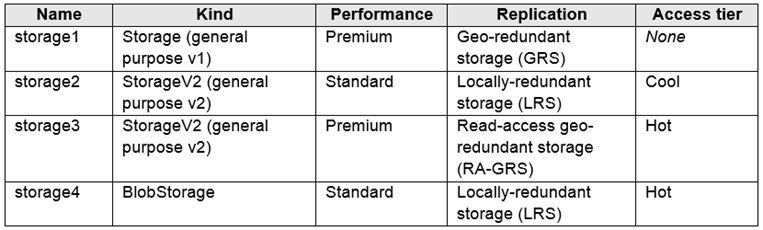
You need to identify which storage account can be converted to zone-redundant storage (ZRS) replication by requesting a live migration from Azure support.
What should you identify?
You have an Azure subscription that contains the storage accounts shown in the following table.
You need to identify which storage account can be converted to zone-redundant storage (ZRS) replication by requesting a live migration from Azure support.
What should you identify?
한글 번역:
다음 표에 표시된 스토리지 계정이 포함된 Azure 구독이 있습니다.
Azure 지원에 라이브 마이그레이션을 요청하여 영역 중복 스토리지(ZRS) 복제로 변환할 수 있는 스토리지 계정을 식별해야 합니다.
무엇을 식별해야 합니까?
다음 표에 표시된 스토리지 계정이 포함된 Azure 구독이 있습니다.
Azure 지원에 라이브 마이그레이션을 요청하여 영역 중복 스토리지(ZRS) 복제로 변환할 수 있는 스토리지 계정을 식별해야 합니다.
무엇을 식별해야 합니까?
A. storage1
B. storage2
C. storage3
D. storage4
제시된 답변: B
문제 해석:
Azure Storage의 라이브 마이그레이션을 통한 ZRS 변환 요구사항을 이해하는 문제입니다.
Azure Storage의 라이브 마이그레이션을 통한 ZRS 변환 요구사항을 이해하는 문제입니다.
해설:
ZRS 라이브 마이그레이션은 GPv2 Standard 계정에서 지원됩니다. storage2가 이 조건을 만족합니다.
ZRS 라이브 마이그레이션은 GPv2 Standard 계정에서 지원됩니다. storage2가 이 조건을 만족합니다.
문제 번호: 16 | 토픽 번호: 3
영어 원문:
You have an Azure subscription that contains a storage account named account1.
You plan to upload the disk files of a virtual machine to account1 from your on-premises network. The on-premises network uses a public IP address space of 131.107.1.0/24.
You plan to use the disk files to provision an Azure virtual machine named VM1. VM1 will be attached to a virtual network named VNet1. VNet1 uses an IP address space of 192.168.0.0/24.
You need to configure account1 to meet the following requirements:
✑ Ensure that you can upload the disk files to account1.
✑ Ensure that you can attach the disks to VM1.
✑ Prevent all other access to account1.
Which two actions should you perform?
You have an Azure subscription that contains a storage account named account1.
You plan to upload the disk files of a virtual machine to account1 from your on-premises network. The on-premises network uses a public IP address space of 131.107.1.0/24.
You plan to use the disk files to provision an Azure virtual machine named VM1. VM1 will be attached to a virtual network named VNet1. VNet1 uses an IP address space of 192.168.0.0/24.
You need to configure account1 to meet the following requirements:
✑ Ensure that you can upload the disk files to account1.
✑ Ensure that you can attach the disks to VM1.
✑ Prevent all other access to account1.
Which two actions should you perform?
한글 번역:
account1이라는 스토리지 계정이 포함된 Azure 구독이 있습니다.
온프레미스 네트워크에서 account1로 가상 머신의 디스크 파일을 업로드할 계획입니다. 온프레미스 네트워크는 131.107.1.0/24의 공용 IP 주소 공간을 사용합니다.
디스크 파일을 사용하여 VM1이라는 Azure 가상 머신을 프로비전할 계획입니다. VM1은 VNet1이라는 가상 네트워크에 연결됩니다. VNet1은 192.168.0.0/24의 IP 주소 공간을 사용합니다.
다음 요구 사항을 충족하도록 account1을 구성해야 합니다:
✑ 디스크 파일을 account1에 업로드할 수 있도록 합니다.
✑ 디스크를 VM1에 연결할 수 있도록 합니다.
✑ account1에 대한 다른 모든 액세스를 방지합니다.
account1이라는 스토리지 계정이 포함된 Azure 구독이 있습니다.
온프레미스 네트워크에서 account1로 가상 머신의 디스크 파일을 업로드할 계획입니다. 온프레미스 네트워크는 131.107.1.0/24의 공용 IP 주소 공간을 사용합니다.
디스크 파일을 사용하여 VM1이라는 Azure 가상 머신을 프로비전할 계획입니다. VM1은 VNet1이라는 가상 네트워크에 연결됩니다. VNet1은 192.168.0.0/24의 IP 주소 공간을 사용합니다.
다음 요구 사항을 충족하도록 account1을 구성해야 합니다:
✑ 디스크 파일을 account1에 업로드할 수 있도록 합니다.
✑ 디스크를 VM1에 연결할 수 있도록 합니다.
✑ account1에 대한 다른 모든 액세스를 방지합니다.
A. From the Networking blade of account1, select Selected networks.
B. From the Networking blade of account1, select Allow trusted Microsoft services to access this storage account.
C. From the Networking blade of account1, add the 131.107.1.0/24 IP address range.
D. From the Networking blade of account1, add VNet1.
E. From the Service endpoints blade of VNet1, add a service endpoint.
제시된 답변: AC
문제 해석:
Azure Storage 방화벽 구성을 통한 네트워크 액세스 제어를 이해하는 문제입니다.
Azure Storage 방화벽 구성을 통한 네트워크 액세스 제어를 이해하는 문제입니다.
해설:
A. Selected networks: 선택된 네트워크만 액세스 허용
C. 131.107.1.0/24 IP 범위 추가: 온프레미스 네트워크에서 업로드 허용
VNet1 추가는 필요하지 않으며, VM은 Azure 내부에서 디스크에 액세스할 수 있습니다.
A. Selected networks: 선택된 네트워크만 액세스 허용
C. 131.107.1.0/24 IP 범위 추가: 온프레미스 네트워크에서 업로드 허용
VNet1 추가는 필요하지 않으며, VM은 Azure 내부에서 디스크에 액세스할 수 있습니다.
문제 번호: 17 | 토픽 번호: 3
영어 원문:
DRAG DROP -
You have an on-premises file server named Server1 that runs Windows Server 2016.
You have an Azure subscription that contains an Azure file share.
You deploy an Azure File Sync Storage Sync Service, and you create a sync group.
You need to synchronize files from Server1 to Azure.
Which three actions should you perform in sequence?
DRAG DROP -
You have an on-premises file server named Server1 that runs Windows Server 2016.
You have an Azure subscription that contains an Azure file share.
You deploy an Azure File Sync Storage Sync Service, and you create a sync group.
You need to synchronize files from Server1 to Azure.
Which three actions should you perform in sequence?
한글 번역:
드래그 앤 드롭 -
Windows Server 2016을 실행하는 Server1이라는 온프레미스 파일 서버가 있습니다.
Azure 파일 공유가 포함된 Azure 구독이 있습니다.
Azure File Sync Storage Sync Service를 배포하고 동기화 그룹을 만듭니다.
Server1에서 Azure로 파일을 동기화해야 합니다.
어떤 세 가지 작업을 순서대로 수행해야 합니까?
드래그 앤 드롭 -
Windows Server 2016을 실행하는 Server1이라는 온프레미스 파일 서버가 있습니다.
Azure 파일 공유가 포함된 Azure 구독이 있습니다.
Azure File Sync Storage Sync Service를 배포하고 동기화 그룹을 만듭니다.
Server1에서 Azure로 파일을 동기화해야 합니다.
어떤 세 가지 작업을 순서대로 수행해야 합니까?
제시된 답변:
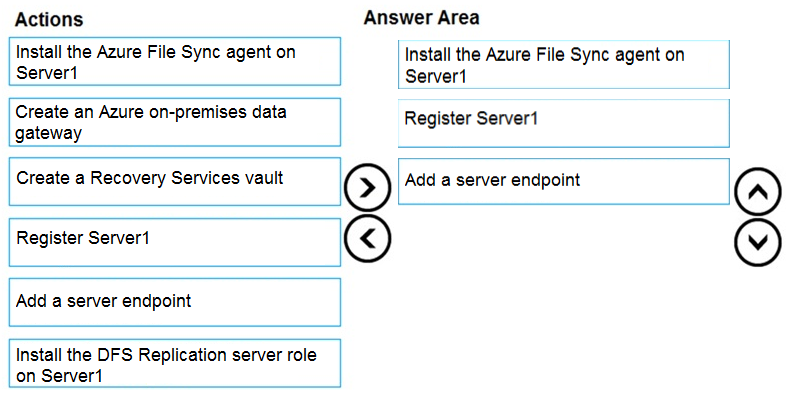
문제 해석:
Azure File Sync 설정의 올바른 순서를 이해하는 문제입니다.
Azure File Sync 설정의 올바른 순서를 이해하는 문제입니다.
해설:
순서:
1. Install the Azure File Sync agent on Server1
2. Register Server1
3. Add a server endpoint
순서:
1. Install the Azure File Sync agent on Server1
2. Register Server1
3. Add a server endpoint
문제 번호: 18 | 토픽 번호: 3
영어 원문:
HOTSPOT -
You plan to create an Azure Storage account in the Azure region of East US 2.
You need to create a storage account that meets the following requirements:
✑ Replicates synchronously.
✑ Remains available if a single data center in the region fails.
How should you configure the storage account?
HOTSPOT -
You plan to create an Azure Storage account in the Azure region of East US 2.
You need to create a storage account that meets the following requirements:
✑ Replicates synchronously.
✑ Remains available if a single data center in the region fails.
How should you configure the storage account?
한글 번역:
핫스팟 -
East US 2 Azure 지역에 Azure Storage 계정을 만들 계획입니다.
다음 요구 사항을 충족하는 스토리지 계정을 만들어야 합니다:
✑ 동기적으로 복제됩니다.
✑ 지역의 단일 데이터 센터가 실패하면 계속 사용할 수 있습니다.
핫스팟 -
East US 2 Azure 지역에 Azure Storage 계정을 만들 계획입니다.
다음 요구 사항을 충족하는 스토리지 계정을 만들어야 합니다:
✑ 동기적으로 복제됩니다.
✑ 지역의 단일 데이터 센터가 실패하면 계속 사용할 수 있습니다.
제시된 답변:
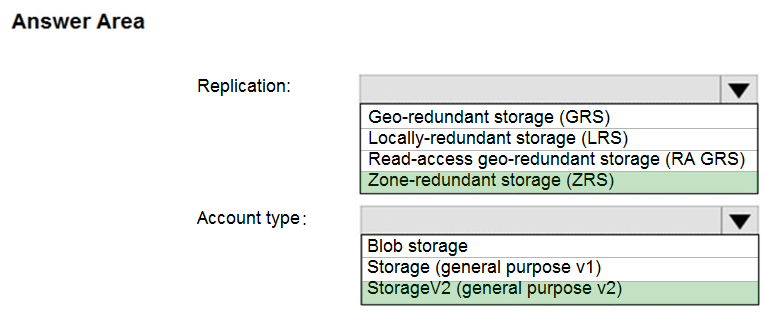
문제 해석:
Azure Storage 중복성 옵션과 동기/비동기 복제를 이해하는 문제입니다.
Azure Storage 중복성 옵션과 동기/비동기 복제를 이해하는 문제입니다.
해설:
Box 1: Zone-redundant storage (ZRS) - 동기 복제, 데이터 센터 장애 시 가용성 유지
Box 2: StorageV2 (general purpose V2) - ZRS는 GPv2에서만 지원
Box 1: Zone-redundant storage (ZRS) - 동기 복제, 데이터 센터 장애 시 가용성 유지
Box 2: StorageV2 (general purpose V2) - ZRS는 GPv2에서만 지원
문제 번호: 19 | 토픽 번호: 3
영어 원문:
You plan to use the Azure Import/Export service to copy files to a storage account.
Which two files should you create before you prepare the drives for the import job?
You plan to use the Azure Import/Export service to copy files to a storage account.
Which two files should you create before you prepare the drives for the import job?
한글 번역:
Azure Import/Export 서비스를 사용하여 스토리지 계정에 파일을 복사할 계획입니다.
가져오기 작업을 위해 드라이브를 준비하기 전에 만들어야 하는 두 파일은 무엇입니까?
Azure Import/Export 서비스를 사용하여 스토리지 계정에 파일을 복사할 계획입니다.
가져오기 작업을 위해 드라이브를 준비하기 전에 만들어야 하는 두 파일은 무엇입니까?
A. an XML manifest file
B. a dataset CSV file
C. a JSON configuration file
D. a PowerShell PS1 file
E. a driveset CSV file
제시된 답변: BE
문제 해석:
Azure Import/Export 서비스 사용 시 필요한 구성 파일을 이해하는 문제입니다.
Azure Import/Export 서비스 사용 시 필요한 구성 파일을 이해하는 문제입니다.
해설:
B. dataset CSV file: 가져올 데이터 세트 정의
E. driveset CSV file: 사용할 드라이브 세트 정의
B. dataset CSV file: 가져올 데이터 세트 정의
E. driveset CSV file: 사용할 드라이브 세트 정의
문제 번호: 20 | 토픽 번호: 3
영어 원문:
You have a Recovery Service vault that you use to test backups. The test backups contain two protected virtual machines.
You need to delete the Recovery Services vault.
What should you do first?
You have a Recovery Service vault that you use to test backups. The test backups contain two protected virtual machines.
You need to delete the Recovery Services vault.
What should you do first?
한글 번역:
백업 테스트에 사용하는 Recovery Service 자격 증명 모음이 있습니다. 테스트 백업에는 두 개의 보호된 가상 머신이 포함되어 있습니다.
Recovery Services 자격 증명 모음을 삭제해야 합니다.
먼저 무엇을 해야 합니까?
백업 테스트에 사용하는 Recovery Service 자격 증명 모음이 있습니다. 테스트 백업에는 두 개의 보호된 가상 머신이 포함되어 있습니다.
Recovery Services 자격 증명 모음을 삭제해야 합니다.
먼저 무엇을 해야 합니까?
A. From the Recovery Service vault, delete the backup data.
B. Modify the disaster recovery properties of each virtual machine.
C. Modify the locks of each virtual machine.
D. From the Recovery Service vault, stop the backup of each backup item.
제시된 답변: D
문제 해석:
Recovery Services 자격 증명 모음 삭제 전 필요한 전제 조건을 이해하는 문제입니다.
Recovery Services 자격 증명 모음 삭제 전 필요한 전제 조건을 이해하는 문제입니다.
해설:
Recovery Services 자격 증명 모음을 삭제하기 전에 먼저 모든 백업 항목의 보호를 중지해야 합니다.
Recovery Services 자격 증명 모음을 삭제하기 전에 먼저 모든 백업 항목의 보호를 중지해야 합니다.
문제 번호: 21 | 토픽 번호: 3
영어 원문:
HOTSPOT -
You have an Azure subscription named Subscription1 that contains the resources shown in the following table.
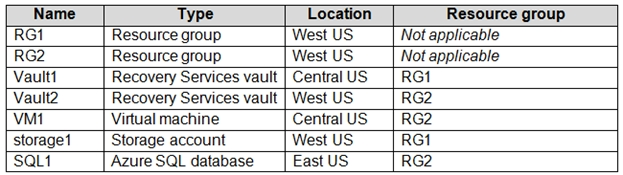
In storage1, you create a blob container named blob1 and a file share named share1.
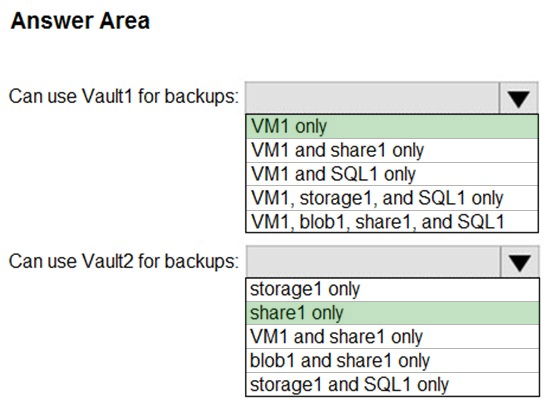
Which resources can be backed up to Vault1 and Vault2?
HOTSPOT -
You have an Azure subscription named Subscription1 that contains the resources shown in the following table.
In storage1, you create a blob container named blob1 and a file share named share1.
Which resources can be backed up to Vault1 and Vault2?
한글 번역:
핫스팟 -
다음 표에 표시된 리소스가 포함된 Subscription1이라는 Azure 구독이 있습니다.
storage1에서 blob1이라는 blob 컨테이너와 share1이라는 파일 공유를 만듭니다.
Vault1과 Vault2에 백업할 수 있는 리소스는 무엇입니까?
핫스팟 -
다음 표에 표시된 리소스가 포함된 Subscription1이라는 Azure 구독이 있습니다.
storage1에서 blob1이라는 blob 컨테이너와 share1이라는 파일 공유를 만듭니다.
Vault1과 Vault2에 백업할 수 있는 리소스는 무엇입니까?
제시된 답변:
문제 해석:
Recovery Services 자격 증명 모음의 지역별 백업 지원을 이해하는 문제입니다.
Recovery Services 자격 증명 모음의 지역별 백업 지원을 이해하는 문제입니다.
해설:
Box 1: VM1 only - VM1은 Vault1과 같은 지역에 있음
Box 2: Share1 only - Storage1은 Vault2와 같은 지역에 있음. Blob은 서비스 자격 증명 모음으로 백업할 수 없음
Box 1: VM1 only - VM1은 Vault1과 같은 지역에 있음
Box 2: Share1 only - Storage1은 Vault2와 같은 지역에 있음. Blob은 서비스 자격 증명 모음으로 백업할 수 없음
문제 번호: 22 | 토픽 번호: 3
영어 원문:
You have an Azure subscription named Subscription1.
You have 5 TB of data that you need to transfer to Subscription1.
You plan to use an Azure Import/Export job.
What can you use as the destination of the imported data?
You have an Azure subscription named Subscription1.
You have 5 TB of data that you need to transfer to Subscription1.
You plan to use an Azure Import/Export job.
What can you use as the destination of the imported data?
한글 번역:
Subscription1이라는 Azure 구독이 있습니다.
Subscription1로 전송해야 하는 5TB의 데이터가 있습니다.
Azure Import/Export 작업을 사용할 계획입니다.
가져온 데이터의 대상으로 무엇을 사용할 수 있습니까?
Subscription1이라는 Azure 구독이 있습니다.
Subscription1로 전송해야 하는 5TB의 데이터가 있습니다.
Azure Import/Export 작업을 사용할 계획입니다.
가져온 데이터의 대상으로 무엇을 사용할 수 있습니까?
A. a virtual machine
B. an Azure Cosmos DB database
C. Azure File Storage
D. the Azure File Sync Storage Sync Service
제시된 답변: C
문제 해석:
Azure Import/Export 서비스가 지원하는 대상 서비스를 이해하는 문제입니다.
Azure Import/Export 서비스가 지원하는 대상 서비스를 이해하는 문제입니다.
해설:
Azure Import/Export 서비스는 Azure Blob Storage와 Azure Files만 지원합니다.
Azure Import/Export 서비스는 Azure Blob Storage와 Azure Files만 지원합니다.
문제 번호: 23 | 토픽 번호: 3
영어 원문:
HOTSPOT -
You have an Azure subscription.
You create the Azure Storage account shown in the following exhibit.
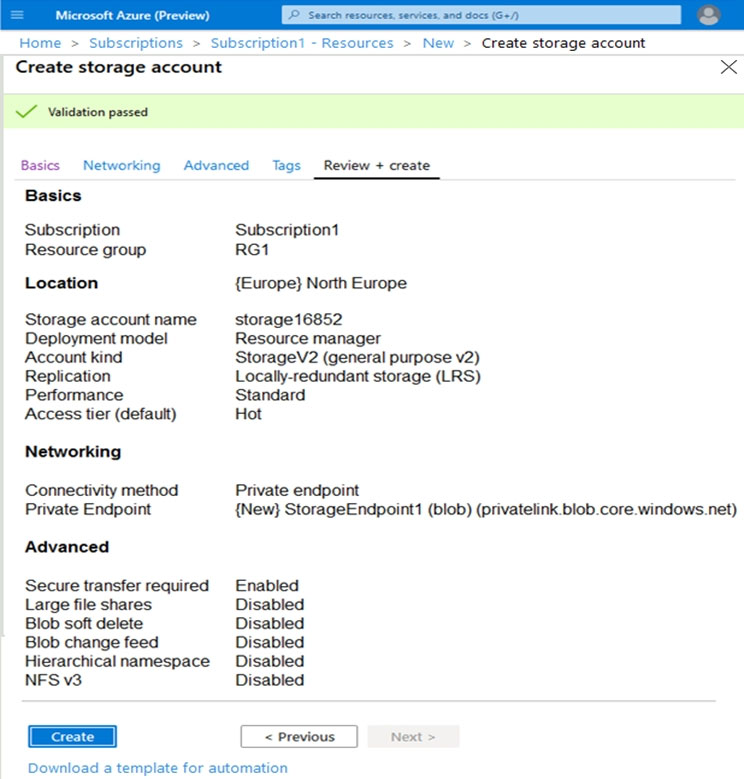
Use the drop-down menus to select the answer choice that completes each statement based on the information presented in the graphic.
HOTSPOT -
You have an Azure subscription.
You create the Azure Storage account shown in the following exhibit.
Use the drop-down menus to select the answer choice that completes each statement based on the information presented in the graphic.
한글 번역:
핫스팟 -
Azure 구독이 있습니다.
다음 전시에 표시된 Azure Storage 계정을 만듭니다.
그래픽에 제시된 정보를 기반으로 각 문을 완성하는 답변 선택지를 드롭다운 메뉴를 사용하여 선택하십시오.
핫스팟 -
Azure 구독이 있습니다.
다음 전시에 표시된 Azure Storage 계정을 만듭니다.
그래픽에 제시된 정보를 기반으로 각 문을 완성하는 답변 선택지를 드롭다운 메뉴를 사용하여 선택하십시오.
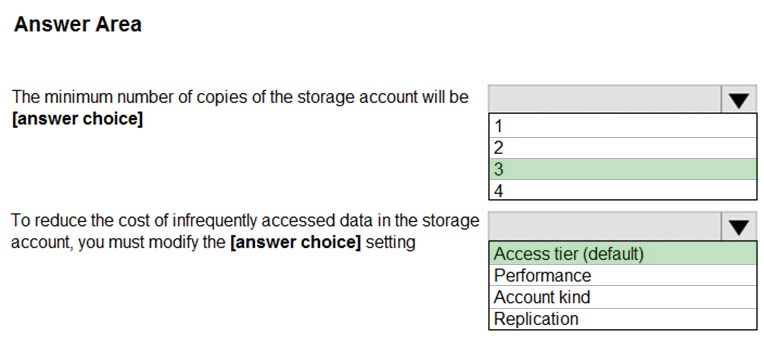
제시된 답변:
문제 해석:
LRS(로컬 중복 스토리지)의 특성과 비용 최적화 방법을 이해하는 문제입니다.
LRS(로컬 중복 스토리지)의 특성과 비용 최적화 방법을 이해하는 문제입니다.
해설:
Box 1: 3 - LRS는 기본 위치에서 3개 복사본 유지
Box 2: Access tier - Hot에서 Cool로 액세스 계층 변경하여 비용 절약
Box 1: 3 - LRS는 기본 위치에서 3개 복사본 유지
Box 2: Access tier - Hot에서 Cool로 액세스 계층 변경하여 비용 절약
문제 번호: 24 | 토픽 번호: 3
영어 원문:
You have an Azure Storage account named storage1.
You plan to use AzCopy to copy data to storage1.
You need to identify the storage services in storage1 to which you can copy the data.
Which storage services should you identify?
You have an Azure Storage account named storage1.
You plan to use AzCopy to copy data to storage1.
You need to identify the storage services in storage1 to which you can copy the data.
Which storage services should you identify?
한글 번역:
storage1이라는 Azure Storage 계정이 있습니다.
AzCopy를 사용하여 storage1에 데이터를 복사할 계획입니다.
데이터를 복사할 수 있는 storage1의 스토리지 서비스를 식별해야 합니다.
어떤 스토리지 서비스를 식별해야 합니까?
storage1이라는 Azure Storage 계정이 있습니다.
AzCopy를 사용하여 storage1에 데이터를 복사할 계획입니다.
데이터를 복사할 수 있는 storage1의 스토리지 서비스를 식별해야 합니다.
어떤 스토리지 서비스를 식별해야 합니까?
A. blob, file, table, and queue
B. blob and file only
C. file and table only
D. file only
E. blob, table, and queue only
제시된 답변: B
문제 해석:
AzCopy 도구가 지원하는 Azure Storage 서비스를 이해하는 문제입니다.
AzCopy 도구가 지원하는 Azure Storage 서비스를 이해하는 문제입니다.
해설:
AzCopy v10은 Azure Blob Storage와 Azure Files만 지원합니다. Table과 Queue는 지원하지 않습니다.
AzCopy v10은 Azure Blob Storage와 Azure Files만 지원합니다. Table과 Queue는 지원하지 않습니다.
문제 번호: 25 | 토픽 번호: 3
영어 원문:
HOTSPOT -
You have an Azure Storage account named storage1 that uses Azure Blob storage and Azure File storage.
You need to use AzCopy to copy data to the blob storage and file storage in storage1.
Which authentication method should you use for each type of storage?
HOTSPOT -
You have an Azure Storage account named storage1 that uses Azure Blob storage and Azure File storage.
You need to use AzCopy to copy data to the blob storage and file storage in storage1.
Which authentication method should you use for each type of storage?
한글 번역:
핫스팟 -
Azure Blob 스토리지와 Azure File 스토리지를 사용하는 storage1이라는 Azure Storage 계정이 있습니다.
AzCopy를 사용하여 storage1의 blob 스토리지와 파일 스토리지에 데이터를 복사해야 합니다.
각 스토리지 유형에 대해 어떤 인증 방법을 사용해야 합니까?
핫스팟 -
Azure Blob 스토리지와 Azure File 스토리지를 사용하는 storage1이라는 Azure Storage 계정이 있습니다.
AzCopy를 사용하여 storage1의 blob 스토리지와 파일 스토리지에 데이터를 복사해야 합니다.
각 스토리지 유형에 대해 어떤 인증 방법을 사용해야 합니까?
제시된 답변:
문제 해석:
AzCopy에서 지원하는 인증 방법을 스토리지 유형별로 이해하는 문제입니다.
AzCopy에서 지원하는 인증 방법을 스토리지 유형별로 이해하는 문제입니다.
해설:
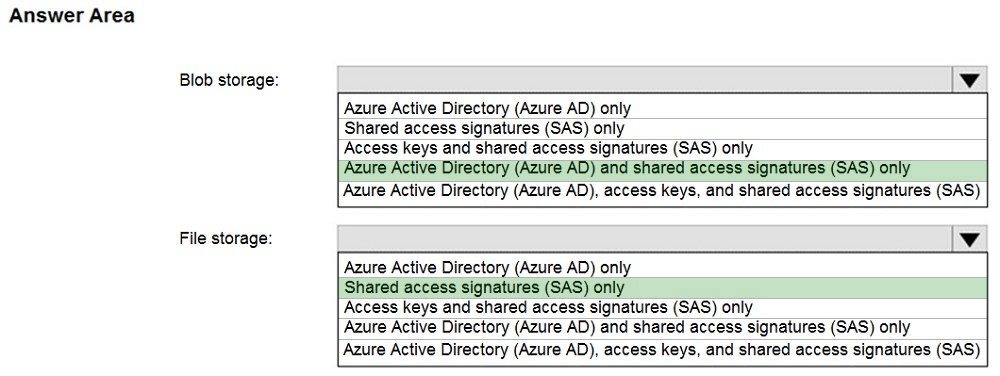
Blob storage: Azure AD와 SAS 토큰 모두 지원
File storage: SAS 토큰만 지원
Blob storage: Azure AD와 SAS 토큰 모두 지원
File storage: SAS 토큰만 지원
문제 번호: 26 | 토픽 번호: 3
영어 원문:
You have an Azure subscription that contains an Azure Storage account.
You plan to create an Azure container instance named container1 that will use a Docker image named Image1. Image1 contains a Microsoft SQL Server instance that requires persistent storage.
You need to configure a storage service for Container1.
What should you use?
You have an Azure subscription that contains an Azure Storage account.
You plan to create an Azure container instance named container1 that will use a Docker image named Image1. Image1 contains a Microsoft SQL Server instance that requires persistent storage.
You need to configure a storage service for Container1.
What should you use?
한글 번역:
Azure Storage 계정이 포함된 Azure 구독이 있습니다.
Image1이라는 Docker 이미지를 사용할 container1이라는 Azure 컨테이너 인스턴스를 만들 계획입니다. Image1에는 영구 스토리지가 필요한 Microsoft SQL Server 인스턴스가 포함되어 있습니다.
Container1에 대한 스토리지 서비스를 구성해야 합니다.
무엇을 사용해야 합니까?
Azure Storage 계정이 포함된 Azure 구독이 있습니다.
Image1이라는 Docker 이미지를 사용할 container1이라는 Azure 컨테이너 인스턴스를 만들 계획입니다. Image1에는 영구 스토리지가 필요한 Microsoft SQL Server 인스턴스가 포함되어 있습니다.
Container1에 대한 스토리지 서비스를 구성해야 합니다.
무엇을 사용해야 합니까?
A. Azure Files
B. Azure Blob storage
C. Azure Queue storage
D. Azure Table storage
제시된 답변: A
문제 해석:
Azure Container Instances에서 SQL Server와 같은 데이터베이스를 위한 적절한 스토리지를 선택하는 문제입니다.
Azure Container Instances에서 SQL Server와 같은 데이터베이스를 위한 적절한 스토리지를 선택하는 문제입니다.
해설:
SQL Server는 파일 시스템 액세스가 필요하므로 Azure Files가 적합합니다. SMB 프로토콜을 통해 파일 시스템 인터페이스를 제공합니다.
SQL Server는 파일 시스템 액세스가 필요하므로 Azure Files가 적합합니다. SMB 프로토콜을 통해 파일 시스템 인터페이스를 제공합니다.
문제 번호: 27 | 토픽 번호: 3
영어 원문:
You have an app named App1 that runs on two Azure virtual machines named VM1 and VM2.
You plan to implement an Azure Availability Set for App1. The solution must ensure that App1 is available during planned maintenance of the hardware hosting VM1 and VM2.
What should you include in the Availability Set?
You have an app named App1 that runs on two Azure virtual machines named VM1 and VM2.
You plan to implement an Azure Availability Set for App1. The solution must ensure that App1 is available during planned maintenance of the hardware hosting VM1 and VM2.
What should you include in the Availability Set?
한글 번역:
VM1과 VM2라는 두 Azure 가상 머신에서 실행되는 App1이라는 앱이 있습니다.
App1에 대한 Azure 가용성 집합을 구현할 계획입니다. 솔루션은 VM1과 VM2를 호스팅하는 하드웨어의 계획된 유지 관리 중에 App1을 사용할 수 있도록 해야 합니다.
가용성 집합에 무엇을 포함해야 합니까?
VM1과 VM2라는 두 Azure 가상 머신에서 실행되는 App1이라는 앱이 있습니다.
App1에 대한 Azure 가용성 집합을 구현할 계획입니다. 솔루션은 VM1과 VM2를 호스팅하는 하드웨어의 계획된 유지 관리 중에 App1을 사용할 수 있도록 해야 합니다.
가용성 집합에 무엇을 포함해야 합니까?
A. one update domain
B. two fault domains
C. one fault domain
D. two update domains
제시된 답변: D
문제 해석:
Azure 가용성 집합의 업데이트 도메인과 장애 도메인을 이해하는 문제입니다.
Azure 가용성 집합의 업데이트 도메인과 장애 도메인을 이해하는 문제입니다.
해설:
계획된 유지 관리 중 가용성을 보장하려면 두 개의 업데이트 도메인이 필요합니다. 이렇게 하면 한 번에 하나의 도메인만 유지 관리를 받게 됩니다.
계획된 유지 관리 중 가용성을 보장하려면 두 개의 업데이트 도메인이 필요합니다. 이렇게 하면 한 번에 하나의 도메인만 유지 관리를 받게 됩니다.
문제 번호: 28 | 토픽 번호: 3
영어 원문:
You have an Azure subscription named Subscription1.
You have 5 TB of data that you need to transfer to Subscription1.
You plan to use an Azure Import/Export job.
What can you use as the destination of the imported data?
You have an Azure subscription named Subscription1.
You have 5 TB of data that you need to transfer to Subscription1.
You plan to use an Azure Import/Export job.
What can you use as the destination of the imported data?
한글 번역:
Subscription1이라는 Azure 구독이 있습니다.
Subscription1로 전송해야 하는 5TB의 데이터가 있습니다.
Azure Import/Export 작업을 사용할 계획입니다.
가져온 데이터의 대상으로 무엇을 사용할 수 있습니까?
Subscription1이라는 Azure 구독이 있습니다.
Subscription1로 전송해야 하는 5TB의 데이터가 있습니다.
Azure Import/Export 작업을 사용할 계획입니다.
가져온 데이터의 대상으로 무엇을 사용할 수 있습니까?
A. an Azure Cosmos DB database
B. Azure Blob storage
C. Azure Data Lake Store
D. the Azure File Sync Storage Sync Service
제시된 답변: B
문제 해석:
Azure Import/Export 서비스가 지원하는 스토리지 대상을 이해하는 문제입니다.
Azure Import/Export 서비스가 지원하는 스토리지 대상을 이해하는 문제입니다.
해설:
Azure Import/Export 서비스는 Azure Blob Storage와 Azure Files를 대상으로 지원합니다.
Azure Import/Export 서비스는 Azure Blob Storage와 Azure Files를 대상으로 지원합니다.
문제 번호: 29 | 토픽 번호: 3
영어 원문:
DRAG DROP -
You have an Azure subscription that contains an Azure file share.
You have an on-premises server named Server1 that runs Windows Server 2016.
You plan to set up Azure File Sync between Server1 and the Azure file share.
You need to prepare the subscription for the planned Azure File Sync.
Which two actions should you perform in the Azure subscription?
DRAG DROP -
You have an Azure subscription that contains an Azure file share.
You have an on-premises server named Server1 that runs Windows Server 2016.
You plan to set up Azure File Sync between Server1 and the Azure file share.
You need to prepare the subscription for the planned Azure File Sync.
Which two actions should you perform in the Azure subscription?
한글 번역:
드래그 앤 드롭 -
Azure 파일 공유가 포함된 Azure 구독이 있습니다.
Windows Server 2016을 실행하는 Server1이라는 온프레미스 서버가 있습니다.
Server1과 Azure 파일 공유 간에 Azure File Sync를 설정할 계획입니다.
계획된 Azure File Sync를 위해 구독을 준비해야 합니다.
Azure 구독에서 어떤 두 가지 작업을 수행해야 합니까?
드래그 앤 드롭 -
Azure 파일 공유가 포함된 Azure 구독이 있습니다.
Windows Server 2016을 실행하는 Server1이라는 온프레미스 서버가 있습니다.
Server1과 Azure 파일 공유 간에 Azure File Sync를 설정할 계획입니다.
계획된 Azure File Sync를 위해 구독을 준비해야 합니다.
Azure 구독에서 어떤 두 가지 작업을 수행해야 합니까?
제시된 답변:

문제 해석:
Azure File Sync 설정을 위한 Azure 측 준비 작업을 이해하는 문제입니다.
Azure File Sync 설정을 위한 Azure 측 준비 작업을 이해하는 문제입니다.
해설:
Azure 구독에서 수행할 작업:
1. Create a Storage Sync Service
2. Create a sync group
Azure 구독에서 수행할 작업:
1. Create a Storage Sync Service
2. Create a sync group
문제 번호: 30 | 토픽 번호: 3
영어 원문:
HOTSPOT -
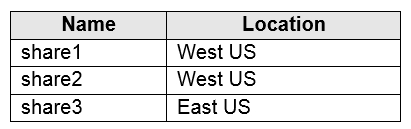
You have an Azure subscription that contains the file shares shown in the following table.
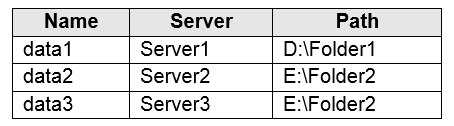
You have the on-premises file shares shown in the following table.
You create an Azure file sync group named Sync1 and perform the following actions:
✑ Add share1 as the cloud endpoint for Sync1.
✑ Add data1 as a server endpoint for Sync1.
✑ Register Server1 and Server2 to Sync1.
HOTSPOT -
You have an Azure subscription that contains the file shares shown in the following table.
You have the on-premises file shares shown in the following table.
You create an Azure file sync group named Sync1 and perform the following actions:
✑ Add share1 as the cloud endpoint for Sync1.
✑ Add data1 as a server endpoint for Sync1.
✑ Register Server1 and Server2 to Sync1.
한글 번역:
핫스팟 -
다음 표에 표시된 파일 공유가 포함된 Azure 구독이 있습니다.
다음 표에 표시된 온프레미스 파일 공유가 있습니다.
Sync1이라는 Azure 파일 동기화 그룹을 만들고 다음 작업을 수행합니다:
✑ share1을 Sync1의 클라우드 엔드포인트로 추가합니다.
✑ data1을 Sync1의 서버 엔드포인트로 추가합니다.
✑ Server1과 Server2를 Sync1에 등록합니다.
핫스팟 -
다음 표에 표시된 파일 공유가 포함된 Azure 구독이 있습니다.
다음 표에 표시된 온프레미스 파일 공유가 있습니다.
Sync1이라는 Azure 파일 동기화 그룹을 만들고 다음 작업을 수행합니다:
✑ share1을 Sync1의 클라우드 엔드포인트로 추가합니다.
✑ data1을 Sync1의 서버 엔드포인트로 추가합니다.
✑ Server1과 Server2를 Sync1에 등록합니다.
제시된 답변:
문제 해석:
Azure File Sync 그룹에서 서버 등록과 엔드포인트 추가의 차이를 이해하는 문제입니다.
Azure File Sync 그룹에서 서버 등록과 엔드포인트 추가의 차이를 이해하는 문제입니다.
해설:
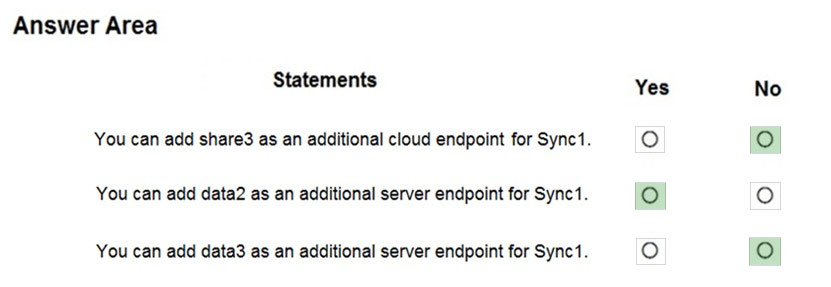
Box 1: No - 동기화 그룹은 하나의 클라우드 엔드포인트와 하나 이상의 서버 엔드포인트를 포함해야 함
Box 2: Yes - Data2는 등록된 Server2에 위치함
Box 3: No - Data3는 등록되지 않은 Server3에 위치함
Box 1: No - 동기화 그룹은 하나의 클라우드 엔드포인트와 하나 이상의 서버 엔드포인트를 포함해야 함
Box 2: Yes - Data2는 등록된 Server2에 위치함
Box 3: No - Data3는 등록되지 않은 Server3에 위치함
문제 번호: 31 | 토픽 번호: 3
영어 원문:
HOTSPOT -
You have an Azure subscription named Subscription1 that contains the resources shown in the following table:
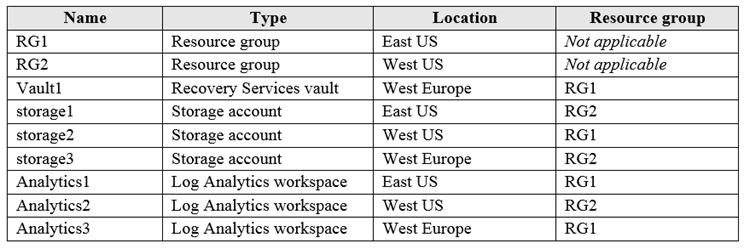
You plan to configure Azure Backup reports for Vault1.
You are configuring the Diagnostics settings for the AzureBackupReports log.
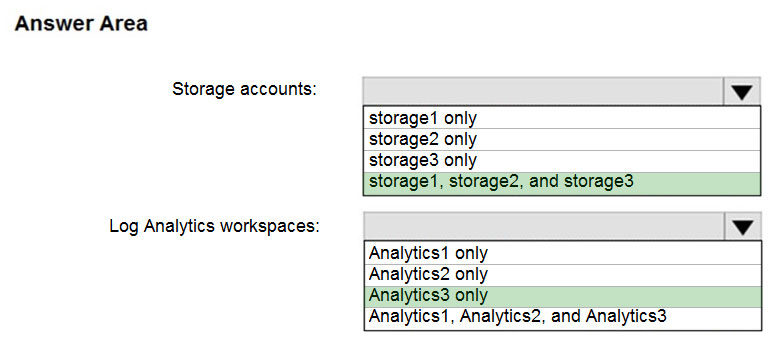
Which storage accounts and which Log Analytics workspaces can you use for the Azure Backup reports of Vault1?
HOTSPOT -
You have an Azure subscription named Subscription1 that contains the resources shown in the following table:
You plan to configure Azure Backup reports for Vault1.
You are configuring the Diagnostics settings for the AzureBackupReports log.
Which storage accounts and which Log Analytics workspaces can you use for the Azure Backup reports of Vault1?
한글 번역:
핫스팟 -
다음 표에 표시된 리소스가 포함된 Subscription1이라는 Azure 구독이 있습니다:
Vault1에 대한 Azure Backup 보고서를 구성할 계획입니다.
AzureBackupReports 로그에 대한 진단 설정을 구성하고 있습니다.
Vault1의 Azure Backup 보고서에 사용할 수 있는 스토리지 계정과 Log Analytics 작업 영역은 무엇입니까?
핫스팟 -
다음 표에 표시된 리소스가 포함된 Subscription1이라는 Azure 구독이 있습니다:
Vault1에 대한 Azure Backup 보고서를 구성할 계획입니다.
AzureBackupReports 로그에 대한 진단 설정을 구성하고 있습니다.
Vault1의 Azure Backup 보고서에 사용할 수 있는 스토리지 계정과 Log Analytics 작업 영역은 무엇입니까?
제시된 답변:
문제 해석:
Azure Backup 보고서 구성 시 지역별 제약사항을 이해하는 문제입니다.
Azure Backup 보고서 구성 시 지역별 제약사항을 이해하는 문제입니다.
해설:
Box 1: storage1, storage2, and storage3 - 스토리지 계정은 구독과 위치에 독립적
Box 2: Analytics3 - Vault1과 Analytics3가 모두 West Europe에 위치
Box 1: storage1, storage2, and storage3 - 스토리지 계정은 구독과 위치에 독립적
Box 2: Analytics3 - Vault1과 Analytics3가 모두 West Europe에 위치
문제 번호: 32 | 토픽 번호: 3
영어 원문:
HOTSPOT -
You have an Azure subscription that contains the storage accounts shown in the following exhibit.
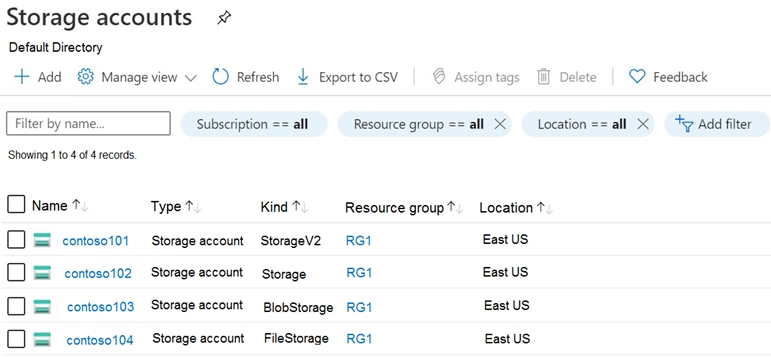
Use the drop-down menus to select the answer choice that completes each statement based on the information presented in the graphic.
HOTSPOT -
You have an Azure subscription that contains the storage accounts shown in the following exhibit.
Use the drop-down menus to select the answer choice that completes each statement based on the information presented in the graphic.
한글 번역:
핫스팟 -
다음 전시에 표시된 스토리지 계정이 포함된 Azure 구독이 있습니다.
그래픽에 제시된 정보를 기반으로 각 문을 완성하는 답변 선택지를 드롭다운 메뉴를 사용하여 선택하십시오.
핫스팟 -
다음 전시에 표시된 스토리지 계정이 포함된 Azure 구독이 있습니다.
그래픽에 제시된 정보를 기반으로 각 문을 완성하는 답변 선택지를 드롭다운 메뉴를 사용하여 선택하십시오.
제시된 답변:

문제 해석:
다양한 스토리지 계정 유형의 특성과 지원 기능을 비교하는 문제입니다.
다양한 스토리지 계정 유형의 특성과 지원 기능을 비교하는 문제입니다.
해설:
스토리지 계정 유형별 지원 기능을 분석하여 각 질문에 대한 답변을 도출합니다.
스토리지 계정 유형별 지원 기능을 분석하여 각 질문에 대한 답변을 도출합니다.
문제 번호: 33 | 토픽 번호: 3
영어 원문:
HOTSPOT -
You have an Azure subscription named Subscription1.
In Subscription1, you create an Azure file share named share1.
You create a shared access signature (SAS) named SAS1 as shown in the following exhibit:

To answer, select the appropriate options in the answer area.
HOTSPOT -
You have an Azure subscription named Subscription1.
In Subscription1, you create an Azure file share named share1.
You create a shared access signature (SAS) named SAS1 as shown in the following exhibit:
To answer, select the appropriate options in the answer area.
한글 번역:
핫스팟 -
Subscription1이라는 Azure 구독이 있습니다.
Subscription1에서 share1이라는 Azure 파일 공유를 만듭니다.
다음 전시에 표시된 대로 SAS1이라는 공유 액세스 서명(SAS)을 만듭니다:
답변하려면 답변 영역에서 적절한 옵션을 선택하십시오.
핫스팟 -
Subscription1이라는 Azure 구독이 있습니다.
Subscription1에서 share1이라는 Azure 파일 공유를 만듭니다.
다음 전시에 표시된 대로 SAS1이라는 공유 액세스 서명(SAS)을 만듭니다:
답변하려면 답변 영역에서 적절한 옵션을 선택하십시오.
제시된 답변:

문제 해석:
Azure Files의 SAS(공유 액세스 서명) 권한과 만료 시간을 이해하는 문제입니다.
Azure Files의 SAS(공유 액세스 서명) 권한과 만료 시간을 이해하는 문제입니다.
해설:
SAS 토큰의 권한과 유효 기간을 분석하여 각 시나리오에서 가능한 작업을 판단합니다.
SAS 토큰의 권한과 유효 기간을 분석하여 각 시나리오에서 가능한 작업을 판단합니다.
문제 번호: 34 | 토픽 번호: 3
영어 원문:
HOTSPOT -
You have an Azure subscription that contains the resources shown in the following table.

Vault1 is configured to back up VM1 by using an enhanced policy that has an instant restore retention range of seven days.
On January 10, VM1 is backed up for the first time.
On January 15, you delete VM1.
For each of the following statements, select Yes if the statement is true. Otherwise, select No.
HOTSPOT -
You have an Azure subscription that contains the resources shown in the following table.
Vault1 is configured to back up VM1 by using an enhanced policy that has an instant restore retention range of seven days.
On January 10, VM1 is backed up for the first time.
On January 15, you delete VM1.
For each of the following statements, select Yes if the statement is true. Otherwise, select No.
한글 번역:
핫스팟 -
다음 표에 표시된 리소스가 포함된 Azure 구독이 있습니다.
Vault1은 7일의 즉시 복원 보존 범위가 있는 향상된 정책을 사용하여 VM1을 백업하도록 구성됩니다.
1월 10일에 VM1이 처음으로 백업됩니다.
1월 15일에 VM1을 삭제합니다.
다음 각 문에 대해 문이 참이면 예를 선택하십시오. 그렇지 않으면 아니요를 선택하십시오.
핫스팟 -
다음 표에 표시된 리소스가 포함된 Azure 구독이 있습니다.
Vault1은 7일의 즉시 복원 보존 범위가 있는 향상된 정책을 사용하여 VM1을 백업하도록 구성됩니다.
1월 10일에 VM1이 처음으로 백업됩니다.
1월 15일에 VM1을 삭제합니다.
다음 각 문에 대해 문이 참이면 예를 선택하십시오. 그렇지 않으면 아니요를 선택하십시오.
제시된 답변:

문제 해석:
Azure Backup의 향상된 정책과 즉시 복원 기능을 이해하는 문제입니다.
Azure Backup의 향상된 정책과 즉시 복원 기능을 이해하는 문제입니다.
해설:
Azure Backup의 향상된 정책에서는 VM이 삭제되어도 백업 데이터는 보존 정책에 따라 유지됩니다.
Azure Backup의 향상된 정책에서는 VM이 삭제되어도 백업 데이터는 보존 정책에 따라 유지됩니다.
문제 번호: 35 | 토픽 번호: 3
영어 원문:
HOTSPOT -
You have Azure subscription that includes data in following locations:

You plan to export data by using Azure import/export job named Export1.
You need to identify the data that can be exported by using Export1.
Which data should you identify?
HOTSPOT -
You have Azure subscription that includes data in following locations:
You plan to export data by using Azure import/export job named Export1.
You need to identify the data that can be exported by using Export1.
Which data should you identify?
한글 번역:
핫스팟 -
다음 위치에 데이터가 포함된 Azure 구독이 있습니다:
Export1이라는 Azure import/export 작업을 사용하여 데이터를 내보낼 계획입니다.
Export1을 사용하여 내보낼 수 있는 데이터를 식별해야 합니다.
어떤 데이터를 식별해야 합니까?
핫스팟 -
다음 위치에 데이터가 포함된 Azure 구독이 있습니다:
Export1이라는 Azure import/export 작업을 사용하여 데이터를 내보낼 계획입니다.
Export1을 사용하여 내보낼 수 있는 데이터를 식별해야 합니다.
어떤 데이터를 식별해야 합니까?
A. DB1
B. container1
C. share1
D. Table1
제시된 답변: B
문제 해석:
Azure Import/Export 서비스가 지원하는 데이터 유형을 다시 확인하는 문제입니다.
Azure Import/Export 서비스가 지원하는 데이터 유형을 다시 확인하는 문제입니다.
해설:
Azure Import/Export는 Azure Blob Storage(container1)와 Azure Files만 지원합니다. SQL Database, Table Storage는 지원하지 않습니다.
Azure Import/Export는 Azure Blob Storage(container1)와 Azure Files만 지원합니다. SQL Database, Table Storage는 지원하지 않습니다.
문제 번호: 36 | 토픽 번호: 3
영어 원문:
HOTSPOT -
You have an Azure subscription that contains a storage account.
You have an on-premises server named Server1 that runs Windows Server 2016. Server1 has 2 TB of data.
You need to transfer the data to the storage account by using the Azure Import/Export service.
In which order should you perform the actions?
HOTSPOT -
You have an Azure subscription that contains a storage account.
You have an on-premises server named Server1 that runs Windows Server 2016. Server1 has 2 TB of data.
You need to transfer the data to the storage account by using the Azure Import/Export service.
In which order should you perform the actions?
한글 번역:
핫스팟 -
스토리지 계정이 포함된 Azure 구독이 있습니다.
Windows Server 2016을 실행하는 Server1이라는 온프레미스 서버가 있습니다. Server1에는 2TB의 데이터가 있습니다.
Azure Import/Export 서비스를 사용하여 데이터를 스토리지 계정으로 전송해야 합니다.
어떤 순서로 작업을 수행해야 합니까?
핫스팟 -
스토리지 계정이 포함된 Azure 구독이 있습니다.
Windows Server 2016을 실행하는 Server1이라는 온프레미스 서버가 있습니다. Server1에는 2TB의 데이터가 있습니다.
Azure Import/Export 서비스를 사용하여 데이터를 스토리지 계정으로 전송해야 합니다.
어떤 순서로 작업을 수행해야 합니까?
제시된 답변:

문제 해석:
Azure Import/Export 서비스의 전체 워크플로우를 순서대로 이해하는 문제입니다.
Azure Import/Export 서비스의 전체 워크플로우를 순서대로 이해하는 문제입니다.
해설:
Import/Export 작업 순서:
1. 외부 디스크를 Server1에 연결
2. WAImportExport.exe 실행
3. Azure 포털에서 import 작업 생성
4. 외부 디스크를 Azure 데이터 센터로 배송
5. import 작업 상태 모니터링
Import/Export 작업 순서:
1. 외부 디스크를 Server1에 연결
2. WAImportExport.exe 실행
3. Azure 포털에서 import 작업 생성
4. 외부 디스크를 Azure 데이터 센터로 배송
5. import 작업 상태 모니터링
문제 번호: 37 | 토픽 번호: 3
영어 원문:
HOTSPOT -
You have an Azure subscription named Sub1.
You plan to deploy a multi-tiered application that will contain the tiers shown in the following table.

You need to recommend a networking solution to meet the following requirements:
✑ Ensure that communication between the web servers and the business logic servers is spread equally across the business logic servers.
✑ Protect the business logic servers from direct access over the Internet.
✑ Minimize costs.
What should you recommend?
HOTSPOT -
You have an Azure subscription named Sub1.
You plan to deploy a multi-tiered application that will contain the tiers shown in the following table.
You need to recommend a networking solution to meet the following requirements:
✑ Ensure that communication between the web servers and the business logic servers is spread equally across the business logic servers.
✑ Protect the business logic servers from direct access over the Internet.
✑ Minimize costs.
What should you recommend?
한글 번역:
핫스팟 -
Sub1이라는 Azure 구독이 있습니다.
다음 표에 표시된 계층이 포함된 다중 계층 애플리케이션을 배포할 계획입니다.
다음 요구 사항을 충족하는 네트워킹 솔루션을 권장해야 합니다:
✑ 웹 서버와 비즈니스 로직 서버 간의 통신이 비즈니스 로직 서버에 균등하게 분산되도록 합니다.
✑ 인터넷을 통한 직접 액세스로부터 비즈니스 로직 서버를 보호합니다.
✑ 비용을 최소화합니다.
핫스팟 -
Sub1이라는 Azure 구독이 있습니다.
다음 표에 표시된 계층이 포함된 다중 계층 애플리케이션을 배포할 계획입니다.
다음 요구 사항을 충족하는 네트워킹 솔루션을 권장해야 합니다:
✑ 웹 서버와 비즈니스 로직 서버 간의 통신이 비즈니스 로직 서버에 균등하게 분산되도록 합니다.
✑ 인터넷을 통한 직접 액세스로부터 비즈니스 로직 서버를 보호합니다.
✑ 비용을 최소화합니다.
제시된 답변:

문제 해석:
다중 계층 애플리케이션을 위한 적절한 로드 밸런서 선택과 네트워킹 구성을 이해하는 문제입니다.
다중 계층 애플리케이션을 위한 적절한 로드 밸런서 선택과 네트워킹 구성을 이해하는 문제입니다.
해설:
Web tier: Azure Application Gateway (외부 액세스)
Business tier: Azure Load Balancer (내부 로드 밸런싱)
Data tier: 별도 서브넷에 배치
Web tier: Azure Application Gateway (외부 액세스)
Business tier: Azure Load Balancer (내부 로드 밸런싱)
Data tier: 별도 서브넷에 배치
문제 번호: 38 | 토픽 번호: 3
영어 원문:
HOTSPOT -
You have peering configured as shown in the following exhibit.

Use the drop-down menus to select the answer choice that completes each statement based on the information presented in the graphic.
HOTSPOT -
You have peering configured as shown in the following exhibit.
Use the drop-down menus to select the answer choice that completes each statement based on the information presented in the graphic.
한글 번역:
핫스팟 -
다음 전시에 표시된 대로 피어링이 구성되어 있습니다.
그래픽에 제시된 정보를 기반으로 각 문을 완성하는 답변 선택지를 드롭다운 메뉴를 사용하여 선택하십시오.
핫스팟 -
다음 전시에 표시된 대로 피어링이 구성되어 있습니다.
그래픽에 제시된 정보를 기반으로 각 문을 완성하는 답변 선택지를 드롭다운 메뉴를 사용하여 선택하십시오.
제시된 답변:

문제 해석:
Azure VNet 피어링의 연결성과 전이적 라우팅을 이해하는 문제입니다.
Azure VNet 피어링의 연결성과 전이적 라우팅을 이해하는 문제입니다.
해설:
VNet 피어링은 전이적이지 않습니다. 즉, A-B와 B-C가 피어링되어 있어도 A-C 간 직접 연결은 불가능합니다.
VNet 피어링은 전이적이지 않습니다. 즉, A-B와 B-C가 피어링되어 있어도 A-C 간 직접 연결은 불가능합니다.
문제 번호: 39 | 토픽 번호: 3
영어 원문:
HOTSPOT -
You have an Azure virtual network named VNet1 that contains a subnet named Subnet1. Subnet1 contains three Azure virtual machines. Each virtual machine has a public IP address.
The virtual machines host a multi-tier application that has a web tier, a business tier, and a data tier.
You need to recommend a solution to protect the virtual machines from Internet attacks. The solution must meet the following requirements:
✑ The virtual machines must be accessible from the Internet.
✑ The solution must minimize costs.
What should you recommend?
HOTSPOT -
You have an Azure virtual network named VNet1 that contains a subnet named Subnet1. Subnet1 contains three Azure virtual machines. Each virtual machine has a public IP address.
The virtual machines host a multi-tier application that has a web tier, a business tier, and a data tier.
You need to recommend a solution to protect the virtual machines from Internet attacks. The solution must meet the following requirements:
✑ The virtual machines must be accessible from the Internet.
✑ The solution must minimize costs.
What should you recommend?
한글 번역:
핫스팟 -
Subnet1이라는 서브넷이 포함된 VNet1이라는 Azure 가상 네트워크가 있습니다. Subnet1에는 3개의 Azure 가상 머신이 포함되어 있습니다. 각 가상 머신에는 공용 IP 주소가 있습니다.
가상 머신은 웹 계층, 비즈니스 계층 및 데이터 계층이 있는 다중 계층 애플리케이션을 호스팅합니다.
인터넷 공격으로부터 가상 머신을 보호하는 솔루션을 권장해야 합니다. 솔루션은 다음 요구 사항을 충족해야 합니다:
✑ 가상 머신은 인터넷에서 액세스할 수 있어야 합니다.
✑ 솔루션은 비용을 최소화해야 합니다.
핫스팟 -
Subnet1이라는 서브넷이 포함된 VNet1이라는 Azure 가상 네트워크가 있습니다. Subnet1에는 3개의 Azure 가상 머신이 포함되어 있습니다. 각 가상 머신에는 공용 IP 주소가 있습니다.
가상 머신은 웹 계층, 비즈니스 계층 및 데이터 계층이 있는 다중 계층 애플리케이션을 호스팅합니다.
인터넷 공격으로부터 가상 머신을 보호하는 솔루션을 권장해야 합니다. 솔루션은 다음 요구 사항을 충족해야 합니다:
✑ 가상 머신은 인터넷에서 액세스할 수 있어야 합니다.
✑ 솔루션은 비용을 최소화해야 합니다.
제시된 답변:

문제 해석:
Azure의 보안 솔루션 중 비용 효율적이면서 인터넷 액세스를 허용하는 옵션을 선택하는 문제입니다.
Azure의 보안 솔루션 중 비용 효율적이면서 인터넷 액세스를 허용하는 옵션을 선택하는 문제입니다.
해설:
NSG(Network Security Groups)는 가장 비용 효율적인 네트워크 보안 솔루션입니다. 규칙 기반으로 트래픽을 제어할 수 있습니다.
NSG(Network Security Groups)는 가장 비용 효율적인 네트워크 보안 솔루션입니다. 규칙 기반으로 트래픽을 제어할 수 있습니다.
문제 번호: 40 | 토픽 번호: 3
영어 원문:
HOTSPOT -
You have an Azure Storage account named storage1.
You plan to use AzCopy to copy data to storage1.
You need to identify the storage services in storage1 to which you can copy the data.
What should you identify?
HOTSPOT -
You have an Azure Storage account named storage1.
You plan to use AzCopy to copy data to storage1.
You need to identify the storage services in storage1 to which you can copy the data.
What should you identify?
한글 번역:
핫스팟 -
storage1이라는 Azure Storage 계정이 있습니다.
AzCopy를 사용하여 storage1에 데이터를 복사할 계획입니다.
데이터를 복사할 수 있는 storage1의 스토리지 서비스를 식별해야 합니다.
무엇을 식별해야 합니까?
핫스팟 -
storage1이라는 Azure Storage 계정이 있습니다.
AzCopy를 사용하여 storage1에 데이터를 복사할 계획입니다.
데이터를 복사할 수 있는 storage1의 스토리지 서비스를 식별해야 합니다.
무엇을 식별해야 합니까?
A. blob, file, table, and queue
B. blob and file only
C. file and table only
D. file only
E. blob, table, and queue only
제시된 답변: B
문제 해석:
AzCopy v10이 지원하는 Azure Storage 서비스를 확인하는 문제입니다.
AzCopy v10이 지원하는 Azure Storage 서비스를 확인하는 문제입니다.
해설:
AzCopy v10은 Azure Blob Storage와 Azure Files만 지원합니다. Table Storage와 Queue Storage는 지원하지 않습니다.
AzCopy v10은 Azure Blob Storage와 Azure Files만 지원합니다. Table Storage와 Queue Storage는 지원하지 않습니다.
문제 번호: 41 | 토픽 번호: 3
영어 원문:
HOTSPOT -
You have an Azure subscription that contains the virtual networks shown in the following table.

You need to recommend a connectivity solution that will enable the virtual networks to communicate. The solution must minimize cost.
What should you recommend?
HOTSPOT -
You have an Azure subscription that contains the virtual networks shown in the following table.
You need to recommend a connectivity solution that will enable the virtual networks to communicate. The solution must minimize cost.
What should you recommend?
한글 번역:
핫스팟 -
다음 표에 표시된 가상 네트워크가 포함된 Azure 구독이 있습니다.
가상 네트워크가 통신할 수 있도록 하는 연결 솔루션을 권장해야 합니다. 솔루션은 비용을 최소화해야 합니다.
무엇을 권장해야 합니까?
핫스팟 -
다음 표에 표시된 가상 네트워크가 포함된 Azure 구독이 있습니다.
가상 네트워크가 통신할 수 있도록 하는 연결 솔루션을 권장해야 합니다. 솔루션은 비용을 최소화해야 합니다.
무엇을 권장해야 합니까?
제시된 답변:

문제 해석:
여러 VNet 간 연결을 위한 가장 비용 효율적인 솔루션을 선택하는 문제입니다.
여러 VNet 간 연결을 위한 가장 비용 효율적인 솔루션을 선택하는 문제입니다.
해설:
동일 지역 내 VNet: VNet 피어링 (무료)
지역 간 VNet: Global VNet 피어링 (저비용)
VPN Gateway는 더 비싸므로 비용 최적화에 부적합
동일 지역 내 VNet: VNet 피어링 (무료)
지역 간 VNet: Global VNet 피어링 (저비용)
VPN Gateway는 더 비싸므로 비용 최적화에 부적합
문제 번호: 42 | 토픽 번호: 3
영어 원문:
HOTSPOT -
You have an Azure Storage account named storage1.
You have an Azure App Service app named App1 and an app named App2 that runs in an Azure container instance. Each app uses a managed identity.
You need to ensure that App1 and App2 can read blobs from storage1. The solution must meet the following requirements:
✑ Minimize the number of secrets used.
✑ Ensure that App2 can only read from storage1 for the next 30 days.
What should you configure in storage1 for each app?
HOTSPOT -
You have an Azure Storage account named storage1.
You have an Azure App Service app named App1 and an app named App2 that runs in an Azure container instance. Each app uses a managed identity.
You need to ensure that App1 and App2 can read blobs from storage1. The solution must meet the following requirements:
✑ Minimize the number of secrets used.
✑ Ensure that App2 can only read from storage1 for the next 30 days.
What should you configure in storage1 for each app?
한글 번역:
핫스팟 -
storage1이라는 Azure Storage 계정이 있습니다.
App1이라는 Azure App Service 앱과 Azure 컨테이너 인스턴스에서 실행되는 App2라는 앱이 있습니다. 각 앱은 관리 ID를 사용합니다.
App1과 App2가 storage1에서 blob을 읽을 수 있도록 해야 합니다. 솔루션은 다음 요구 사항을 충족해야 합니다:
✑ 사용되는 비밀의 수를 최소화합니다.
✑ App2가 향후 30일 동안만 storage1에서 읽을 수 있도록 합니다.
핫스팟 -
storage1이라는 Azure Storage 계정이 있습니다.
App1이라는 Azure App Service 앱과 Azure 컨테이너 인스턴스에서 실행되는 App2라는 앱이 있습니다. 각 앱은 관리 ID를 사용합니다.
App1과 App2가 storage1에서 blob을 읽을 수 있도록 해야 합니다. 솔루션은 다음 요구 사항을 충족해야 합니다:
✑ 사용되는 비밀의 수를 최소화합니다.
✑ App2가 향후 30일 동안만 storage1에서 읽을 수 있도록 합니다.
제시된 답변:

문제 해석:
관리 ID와 SAS 토큰을 적절히 조합하여 보안과 시간 제한 요구사항을 충족하는 문제입니다.
관리 ID와 SAS 토큰을 적절히 조합하여 보안과 시간 제한 요구사항을 충족하는 문제입니다.
해설:
App1: 관리 ID 사용 (장기간 액세스, 비밀 없음)
App2: SAS 토큰 사용 (30일 제한, 시간 기반 만료)
App1: 관리 ID 사용 (장기간 액세스, 비밀 없음)
App2: SAS 토큰 사용 (30일 제한, 시간 기반 만료)
문제 번호: 43 | 토픽 번호: 3
영어 원문:
HOTSPOT -
You have an Azure subscription that contains a storage account named storage1 and the following virtual machines:
✑ VM1 has a public IP address of 13.68.113.176 and is connected to VNET1/Subnet1
✑ VM2 has a public IP address of 13.68.113.177 and is connected to VNET1/Subnet1
✑ VM3 has a public IP address of 13.68.113.178 and is connected to VNET1/Subnet2
Storage1 has a firewall configured to allow access from the 13.68.113.0/24 address range.
You need to identify which virtual machines can access storage1.
What should you identify?
HOTSPOT -
You have an Azure subscription that contains a storage account named storage1 and the following virtual machines:
✑ VM1 has a public IP address of 13.68.113.176 and is connected to VNET1/Subnet1
✑ VM2 has a public IP address of 13.68.113.177 and is connected to VNET1/Subnet1
✑ VM3 has a public IP address of 13.68.113.178 and is connected to VNET1/Subnet2
Storage1 has a firewall configured to allow access from the 13.68.113.0/24 address range.
You need to identify which virtual machines can access storage1.
What should you identify?
한글 번역:
핫스팟 -
storage1이라는 스토리지 계정과 다음 가상 머신이 포함된 Azure 구독이 있습니다:
✑ VM1의 공용 IP 주소는 13.68.113.176이고 VNET1/Subnet1에 연결되어 있습니다
✑ VM2의 공용 IP 주소는 13.68.113.177이고 VNET1/Subnet1에 연결되어 있습니다
✑ VM3의 공용 IP 주소는 13.68.113.178이고 VNET1/Subnet2에 연결되어 있습니다
Storage1에는 13.68.113.0/24 주소 범위에서의 액세스를 허용하도록 방화벽이 구성되어 있습니다.
storage1에 액세스할 수 있는 가상 머신을 식별해야 합니다.
무엇을 식별해야 합니까?
핫스팟 -
storage1이라는 스토리지 계정과 다음 가상 머신이 포함된 Azure 구독이 있습니다:
✑ VM1의 공용 IP 주소는 13.68.113.176이고 VNET1/Subnet1에 연결되어 있습니다
✑ VM2의 공용 IP 주소는 13.68.113.177이고 VNET1/Subnet1에 연결되어 있습니다
✑ VM3의 공용 IP 주소는 13.68.113.178이고 VNET1/Subnet2에 연결되어 있습니다
Storage1에는 13.68.113.0/24 주소 범위에서의 액세스를 허용하도록 방화벽이 구성되어 있습니다.
storage1에 액세스할 수 있는 가상 머신을 식별해야 합니다.
무엇을 식별해야 합니까?
제시된 답변:

문제 해석:
Azure Storage 방화벽 규칙과 IP 주소 범위를 이해하는 문제입니다.
Azure Storage 방화벽 규칙과 IP 주소 범위를 이해하는 문제입니다.
해설:
모든 VM의 공용 IP 주소(13.68.113.176, 177, 178)가 허용된 범위(13.68.113.0/24) 내에 있으므로 모든 VM이 액세스 가능합니다.
모든 VM의 공용 IP 주소(13.68.113.176, 177, 178)가 허용된 범위(13.68.113.0/24) 내에 있으므로 모든 VM이 액세스 가능합니다.
문제 번호: 44 | 토픽 번호: 3
영어 원문:
HOTSPOT -
You have an Azure subscription that contains an Azure file share.
You have an on-premises server named Server1 that runs Windows Server 2016.
You plan to set up Azure File Sync between Server1 and the Azure file share.
You need to prepare the subscription for the planned Azure File Sync.
Which two actions should you perform in the Azure subscription?
HOTSPOT -
You have an Azure subscription that contains an Azure file share.
You have an on-premises server named Server1 that runs Windows Server 2016.
You plan to set up Azure File Sync between Server1 and the Azure file share.
You need to prepare the subscription for the planned Azure File Sync.
Which two actions should you perform in the Azure subscription?
한글 번역:
핫스팟 -
Azure 파일 공유가 포함된 Azure 구독이 있습니다.
Windows Server 2016을 실행하는 Server1이라는 온프레미스 서버가 있습니다.
Server1과 Azure 파일 공유 간에 Azure File Sync를 설정할 계획입니다.
계획된 Azure File Sync를 위해 구독을 준비해야 합니다.
Azure 구독에서 어떤 두 가지 작업을 수행해야 합니까?
핫스팟 -
Azure 파일 공유가 포함된 Azure 구독이 있습니다.
Windows Server 2016을 실행하는 Server1이라는 온프레미스 서버가 있습니다.
Server1과 Azure 파일 공유 간에 Azure File Sync를 설정할 계획입니다.
계획된 Azure File Sync를 위해 구독을 준비해야 합니다.
Azure 구독에서 어떤 두 가지 작업을 수행해야 합니까?
제시된 답변:

문제 해석:
Azure File Sync 설정을 위한 Azure 측 필수 구성 요소를 이해하는 문제입니다.
Azure File Sync 설정을 위한 Azure 측 필수 구성 요소를 이해하는 문제입니다.
해설:
Azure File Sync 설정을 위해 필요한 작업:
1. Storage Sync Service 생성
2. Sync Group 생성
Azure File Sync 설정을 위해 필요한 작업:
1. Storage Sync Service 생성
2. Sync Group 생성
문제 번호: 45 | 토픽 번호: 3
영어 원문:
HOTSPOT -
You have an Azure subscription that contains the resources shown in the following table.

All virtual networks are hosted in the West US location.
You need to minimize network latency between the virtual networks.
How should you configure VNet2 and VNet3?
HOTSPOT -
You have an Azure subscription that contains the resources shown in the following table.
All virtual networks are hosted in the West US location.
You need to minimize network latency between the virtual networks.
How should you configure VNet2 and VNet3?
한글 번역:
핫스팟 -
다음 표에 표시된 리소스가 포함된 Azure 구독이 있습니다.
모든 가상 네트워크는 West US 위치에 호스팅됩니다.
가상 네트워크 간의 네트워크 대기 시간을 최소화해야 합니다.
VNet2와 VNet3를 어떻게 구성해야 합니까?
핫스팟 -
다음 표에 표시된 리소스가 포함된 Azure 구독이 있습니다.
모든 가상 네트워크는 West US 위치에 호스팅됩니다.
가상 네트워크 간의 네트워크 대기 시간을 최소화해야 합니다.
VNet2와 VNet3를 어떻게 구성해야 합니까?
제시된 답변:

문제 해석:
네트워크 대기 시간 최소화를 위한 VNet 연결 방법을 선택하는 문제입니다.
네트워크 대기 시간 최소화를 위한 VNet 연결 방법을 선택하는 문제입니다.
해설:
VNet 피어링은 Azure 백본을 통해 직접 연결을 제공하므로 VPN Gateway보다 낮은 대기 시간을 제공합니다.
VNet 피어링은 Azure 백본을 통해 직접 연결을 제공하므로 VPN Gateway보다 낮은 대기 시간을 제공합니다.
문제 번호: 46 | 토픽 번호: 3
영어 원문:
HOTSPOT -
You have an Azure subscription that contains three virtual networks named VNet1, VNet2, and VNet3. VNet2 contains a virtual appliance named VM2 that operates as a router.
You are configuring the virtual networks to use the virtual appliance to route traffic between the virtual networks.
You need to create route tables and associate the route tables to the subnets. The solution must ensure that the traffic can flow in both directions.
How should you configure the route tables?
HOTSPOT -
You have an Azure subscription that contains three virtual networks named VNet1, VNet2, and VNet3. VNet2 contains a virtual appliance named VM2 that operates as a router.
You are configuring the virtual networks to use the virtual appliance to route traffic between the virtual networks.
You need to create route tables and associate the route tables to the subnets. The solution must ensure that the traffic can flow in both directions.
How should you configure the route tables?
한글 번역:
핫스팟 -
VNet1, VNet2, VNet3라는 세 개의 가상 네트워크가 포함된 Azure 구독이 있습니다. VNet2에는 라우터로 작동하는 VM2라는 가상 어플라이언스가 포함되어 있습니다.
가상 어플라이언스를 사용하여 가상 네트워크 간 트래픽을 라우팅하도록 가상 네트워크를 구성하고 있습니다.
라우트 테이블을 만들고 서브넷에 연결해야 합니다. 솔루션은 트래픽이 양방향으로 흐를 수 있도록 해야 합니다.
라우트 테이블을 어떻게 구성해야 합니까?
핫스팟 -
VNet1, VNet2, VNet3라는 세 개의 가상 네트워크가 포함된 Azure 구독이 있습니다. VNet2에는 라우터로 작동하는 VM2라는 가상 어플라이언스가 포함되어 있습니다.
가상 어플라이언스를 사용하여 가상 네트워크 간 트래픽을 라우팅하도록 가상 네트워크를 구성하고 있습니다.
라우트 테이블을 만들고 서브넷에 연결해야 합니다. 솔루션은 트래픽이 양방향으로 흐를 수 있도록 해야 합니다.
라우트 테이블을 어떻게 구성해야 합니까?
제시된 답변:

문제 해석:
가상 어플라이언스를 통한 네트워크 라우팅을 위한 라우트 테이블 구성을 이해하는 문제입니다.
가상 어플라이언스를 통한 네트워크 라우팅을 위한 라우트 테이블 구성을 이해하는 문제입니다.
해설:
각 VNet에 적절한 라우트 테이블을 구성하여 VM2를 통한 양방향 라우팅을 구현해야 합니다.
각 VNet에 적절한 라우트 테이블을 구성하여 VM2를 통한 양방향 라우팅을 구현해야 합니다.
문제 번호: 47 | 토픽 번호: 3
영어 원문:
HOTSPOT -
You have an Azure subscription that contains an Azure file share.
You have an on-premises server named Server1 that runs Windows Server 2016.
Server1 has the following volumes:
✑ C: (OS)
✑ D: (Data)
✑ E: (Temp)
You plan to use Azure File Sync to keep a local cache of the Azure file share on Server1.
Which volume can you use for the local cache?
HOTSPOT -
You have an Azure subscription that contains an Azure file share.
You have an on-premises server named Server1 that runs Windows Server 2016.
Server1 has the following volumes:
✑ C: (OS)
✑ D: (Data)
✑ E: (Temp)
You plan to use Azure File Sync to keep a local cache of the Azure file share on Server1.
Which volume can you use for the local cache?
한글 번역:
핫스팟 -
Azure 파일 공유가 포함된 Azure 구독이 있습니다.
Windows Server 2016을 실행하는 Server1이라는 온프레미스 서버가 있습니다.
Server1에는 다음 볼륨이 있습니다:
✑ C: (OS)
✑ D: (Data)
✑ E: (Temp)
Azure File Sync를 사용하여 Server1에 Azure 파일 공유의 로컬 캐시를 유지할 계획입니다.
로컬 캐시에 사용할 수 있는 볼륨은 무엇입니까?
핫스팟 -
Azure 파일 공유가 포함된 Azure 구독이 있습니다.
Windows Server 2016을 실행하는 Server1이라는 온프레미스 서버가 있습니다.
Server1에는 다음 볼륨이 있습니다:
✑ C: (OS)
✑ D: (Data)
✑ E: (Temp)
Azure File Sync를 사용하여 Server1에 Azure 파일 공유의 로컬 캐시를 유지할 계획입니다.
로컬 캐시에 사용할 수 있는 볼륨은 무엇입니까?
제시된 답변:

문제 해석:
Azure File Sync 서버 엔드포인트의 볼륨 요구사항을 이해하는 문제입니다.
Azure File Sync 서버 엔드포인트의 볼륨 요구사항을 이해하는 문제입니다.
해설:
Azure File Sync는 NTFS 파일 시스템과 영구 스토리지가 필요합니다. 임시 볼륨(E:)은 사용할 수 없습니다.
Azure File Sync는 NTFS 파일 시스템과 영구 스토리지가 필요합니다. 임시 볼륨(E:)은 사용할 수 없습니다.
문제 번호: 48 | 토픽 번호: 3
영어 원문:
HOTSPOT -
You have an Azure subscription that contains the resources shown in the following table.

VM1 and VM2 are deployed from the same template and host the same workload. You configure a proximity placement group named PPG1.
You need to identify which resources can be placed in PPG1.
Which resources should you identify?
HOTSPOT -
You have an Azure subscription that contains the resources shown in the following table.
VM1 and VM2 are deployed from the same template and host the same workload. You configure a proximity placement group named PPG1.
You need to identify which resources can be placed in PPG1.
Which resources should you identify?
한글 번역:
핫스팟 -
다음 표에 표시된 리소스가 포함된 Azure 구독이 있습니다.
VM1과 VM2는 동일한 템플릿에서 배포되고 동일한 워크로드를 호스팅합니다. PPG1이라는 근접 배치 그룹을 구성합니다.
PPG1에 배치할 수 있는 리소스를 식별해야 합니다.
어떤 리소스를 식별해야 합니까?
핫스팟 -
다음 표에 표시된 리소스가 포함된 Azure 구독이 있습니다.
VM1과 VM2는 동일한 템플릿에서 배포되고 동일한 워크로드를 호스팅합니다. PPG1이라는 근접 배치 그룹을 구성합니다.
PPG1에 배치할 수 있는 리소스를 식별해야 합니다.
어떤 리소스를 식별해야 합니까?
제시된 답변:

문제 해석:
Azure 근접 배치 그룹에 배치 가능한 리소스 유형을 이해하는 문제입니다.
Azure 근접 배치 그룹에 배치 가능한 리소스 유형을 이해하는 문제입니다.
해설:
근접 배치 그룹에는 가상 머신, 가용성 집합, 가상 머신 확장 집합을 배치할 수 있습니다. 스토리지 계정이나 가상 네트워크는 배치할 수 없습니다.
근접 배치 그룹에는 가상 머신, 가용성 집합, 가상 머신 확장 집합을 배치할 수 있습니다. 스토리지 계정이나 가상 네트워크는 배치할 수 없습니다.
문제 번호: 49 | 토픽 번호: 3
영어 원문:
HOTSPOT -
You have an Azure subscription. The subscription contains a storage account named storage1 that has the lifecycle management rules shown in the following table.

On June 1, you store two blobs in storage1 as shown in the following table.

For each of the following statements, select Yes if the statement is true. Otherwise, select No.
NOTE: Each correct selection is worth one point.

HOTSPOT -
You have an Azure subscription. The subscription contains a storage account named storage1 that has the lifecycle management rules shown in the following table.
On June 1, you store two blobs in storage1 as shown in the following table.
For each of the following statements, select Yes if the statement is true. Otherwise, select No.
NOTE: Each correct selection is worth one point.
한글 번역:
핫스팟 -
Azure 구독이 있습니다. 구독에는 다음 표에 표시된 수명 주기 관리 규칙이 있는 storage1이라는 스토리지 계정이 포함되어 있습니다.
6월 1일에 다음 표에 표시된 대로 storage1에 두 개의 blob을 저장합니다.
다음 각 문에 대해 문이 참이면 예를 선택하십시오. 그렇지 않으면 아니요를 선택하십시오.
참고: 각 올바른 선택은 1점의 가치가 있습니다.
핫스팟 -
Azure 구독이 있습니다. 구독에는 다음 표에 표시된 수명 주기 관리 규칙이 있는 storage1이라는 스토리지 계정이 포함되어 있습니다.
6월 1일에 다음 표에 표시된 대로 storage1에 두 개의 blob을 저장합니다.
다음 각 문에 대해 문이 참이면 예를 선택하십시오. 그렇지 않으면 아니요를 선택하십시오.
참고: 각 올바른 선택은 1점의 가치가 있습니다.
제시된 답변:

문제 해석:
Azure Storage의 수명 주기 관리 규칙이 blob에 어떻게 적용되는지 이해하는 문제입니다. 시간 경과에 따른 blob 계층 변경을 파악해야 합니다.
Azure Storage의 수명 주기 관리 규칙이 blob에 어떻게 적용되는지 이해하는 문제입니다. 시간 경과에 따른 blob 계층 변경을 파악해야 합니다.
해설:
Azure Storage 수명 주기 관리는 다음과 같이 작동합니다:
• 규칙은 매일 실행됩니다
• 마지막 수정 시간을 기준으로 계산됩니다
• 조건을 만족하면 자동으로 계층이 변경됩니다
Rule1: contoso 프리픽스 blob을 30일 후 Cool로, 90일 후 Archive로 이동
Rule2: fabrikam 프리픽스 blob을 30일 후 Archive로 이동
6월 1일 저장된 blob들:
• contosofile.txt (contoso 프리픽스 매치): 7월 1일에 Cool로, 8월 30일에 Archive로 이동
• fabrikamfile.txt (fabrikam 프리픽스 매치): 7월 1일에 Archive로 이동
따라서 7월 2일 기준:
• contosofile.txt는 Cool 계층에 있음
• fabrikamfile.txt는 Archive 계층에 있음
Azure Storage 수명 주기 관리는 다음과 같이 작동합니다:
• 규칙은 매일 실행됩니다
• 마지막 수정 시간을 기준으로 계산됩니다
• 조건을 만족하면 자동으로 계층이 변경됩니다
Rule1: contoso 프리픽스 blob을 30일 후 Cool로, 90일 후 Archive로 이동
Rule2: fabrikam 프리픽스 blob을 30일 후 Archive로 이동
6월 1일 저장된 blob들:
• contosofile.txt (contoso 프리픽스 매치): 7월 1일에 Cool로, 8월 30일에 Archive로 이동
• fabrikamfile.txt (fabrikam 프리픽스 매치): 7월 1일에 Archive로 이동
따라서 7월 2일 기준:
• contosofile.txt는 Cool 계층에 있음
• fabrikamfile.txt는 Archive 계층에 있음